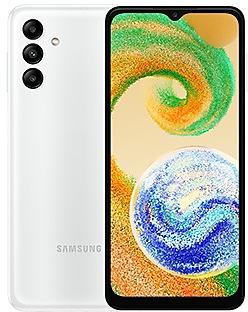
Samsung Galaxy A04s A047MUBU5DXA2 Firmware
Samsung Galaxy A04s A047MUBU5DXA2 is an Android 14 firmware for 13 countries, 37 CSC codes. It is the same firmware configured per region and carrier (CSC). Find your country below, verify the file and download for free. Compared with the previous build A047MUBS5CXA1: Android updated from Android 13 to Android 14. A newer build for SM-A047M is available: A047MUBSGEZH4.
Bootloader binary 5. Flashing firmware with a lower binary is usually blocked by Samsung anti-rollback.
All regional downloads
Pick your region (CSC) to download the matching firmware package.
No matching downloads
Device specifications
- Display diagonal16.5 cm (6.5")
- Display resolution1600 x 720 pixels
- RAM3 GB
- Rear camera resolution50 MP
- Rear camera typeTriple camera
- Battery capacity5000 mAh
- Weight195 g
Specifications of SM-A047F, a regional variant of the same device. Chipset and SIM lines are left out: they can differ by region.
What's new in A047MUBU5DXA2
New button layout
The quick panel has a new layout that makes it easier to access the features you use most. Wi-Fi and Bluetooth now have their own dedicated buttons at the top of the screen, while visual features, like Dark mode and Eye comfort shield have been moved to the bottom. Other quick settings buttons appear in a customizable area in the middle.
Instantly access the full quick panel
By default, a compact quick panel with notifications appears when you swipe down from the top of the screen. Swiping down again hides notifications and shows the expanded quick panel. If you turn on Quick settings instant access, you can view the expanded quick panel by swiping just once from the right side of the top of the screen. Swiping down from the left side shows notifications.
Quickly access brightness control
The brightness control bar now appears by default in the compact quick panel when you swipe down once from the top of the screen for quicker and easier brightness adjustments.
Improved album art display
While playing music or videos, album art will cover the entire media controller in the notification panel if the app playing the music or video provides album art.
Enhanced layout for notifications
Each notification now appears as a separate card, making it easier to recognize individual notifications.
More vivid notification icons
You can use the same full-color icons that are used for each app on the Home and Apps screens. You can turn this on in Settings.
Sort notifications by time
You can now change your notification settings to sort by time instead of priority so your newest notifications are always on top.
Reposition your clock
You now have more freedom to move your clock to the position of your choice on the Lock screen.
Simplified icon labels
App icon labels are now limited to a single line for a cleaner and simpler look. "Galaxy" and "Samsung" have been removed from some app names to make them shorter and easier to scan.
Drag and drop with 2 hands
Start dragging app icons or widgets on your Home screen with one hand, then use your other hand to navigate to the screen where you want to drop them.
Keep pop-up windows open
Instead of minimizing pop-up windows when you go to the Recents screen, pop-ups will now remain open after you leave the Recents screen so you can continue what you were working on.
New emoji design
Emojis that appear in your messages, social media posts, and elsewhere on your phone have been updated with a fresh new design.
Picture previews
When you share pictures from any app, preview images will appear at the top of the Share panel to give you one more chance to review the pictures before sharing them.
New Weather widget
The Weather insights widget provides more information about your local weather conditions. You can see when severe thunderstorms, snow, rain, and other events are on the forecast.
More information in Weather app
Information about snowfall, moon phases and times, atmospheric pressure, visibility distance, dew point, and wind direction is now available in the Weather app.
Interactive map view
Swipe to move around the map and tap a location to view the local weather conditions. The map can help you find weather information even if you don’t know the name of the city.
Enhanced illustrations
Illustrations in the Weather widget and app have been enhanced to provide better information about the current weather conditions. Background colors also change depending on the time of the day.
Simple and intuitive design
The overall layout of the Camera app has been simplified. Quick settings buttons on the preview screen have been redesigned to be easier to understand.
Custom camera widgets
You can add custom camera widgets to your Home screen. You can set each widget to start in a specific shooting mode and save pictures in an album of your choice.
More alignment options for watermarks
You can now choose whether your watermark appears at the top or bottom of your photos.
Quick access to resolution settings
A resolution button is now available in the quick settings at the top of the screen in Photo and Pro modes so you can quickly change the resolution of photos you take.
Easier video size options
A pop-up now appears when you tap the video size button, making it easier to see all the options and choose the right ones.
Keep your pictures level
When grid lines are turned on in Camera settings, a level line will now appear in the middle of the screen while using the rear camera in all modes except Panorama. The line will move to show whether your picture is level with the ground.
Turn off swipe up/down to switch cameras
Swiping up or down to switch between the front and rear cameras is now optional. If you’re concerned about accidental swipes, you can turn this off in Settings.
Apply effects more easily
Filter and face effects now use a dial instead of a slider making it easier to make precise adjustments with just one hand.
Quick edits in detail view
While viewing a picture, swipe up from the bottom of the screen to go to detail view. This screen now provides quick access to effects and editing features you can immediately apply.
Drag and drop with 2 hands
Touch and hold pictures and videos with one hand, then use your other hand to navigate to the album where you want to drop them.
Enhanced story view
While viewing a story, a thumbnail view appears when you swipe up from the bottom of the screen. In thumbnail view, you can add or remove pictures and videos from your story.
Enhanced layout
The new Tools menu makes it easier to find the editing features you need. Straighten and Perspective options have been combined in the Transform menu.
Adjust decorations after saving
You can now make changes to drawings, stickers, and text that you've added to a photo even after saving.
Undo and redo
Don't worry about making mistakes. You can now easily undo or redo transformations, filters, and tones.
Draw on custom stickers
When creating custom stickers, you can now use the drawing tools to make your stickers even more personal and unique.
New text backgrounds and styles
When adding text to a photo, you can choose from several new backgrounds and styles to help you get the perfect look.
Enhanced layout
Video player controls are now easier than ever. Buttons with similar functions have been grouped together, and the Play button has been moved to the center of the screen.
New look for the Home screen
The Samsung Health Home screen has been completely revamped. More information is shown, while bold fonts and colors make it easier to see the information you need most. Your latest exercise result is shown at the top of the screen, and more feedback is provided about your sleep score as well as your daily goals for steps, activity, water, and food.
Custom water cup sizes
You can now customize the size of cups in the Samsung Health Water tracker to match the size of the cup you usually drink from.
Your schedule at a glance
The new schedule view provides your upcoming events, tasks, and reminders all together in chronological order.
View your reminders in Calendar
You can now view and add reminders in the Calendar app without opening the Reminder app.
Move events with 2 hands
In Day or Week view, touch and hold the event you want to move with one hand, then use your other hand to navigate to the day where you want to move it.
Refined reminder list view
The main list view has been redesigned. You can manage categories at the top of the screen. Below the categories, your reminders will be shown organized by date. The layout for reminders containing images and web links has also been enhanced.
New reminder categories
The Place category contains reminders that alert you when you're in a specific place, and the No alert category contains reminders that don't provide any alerts.
More options for creating reminders
When sharing content to the Reminder app, you'll get full editing options before your reminder is created. You can also take pictures using the camera when creating a reminder.
Create all-day reminders
You can now create reminders for an entire day and customize the time you want to be alerted about them.
Play videos in the background
Keep playing video sound even if you leave the current tab or leave the Internet app.
Move bookmarks and tabs with 2 hands
Touch and hold the bookmark or tab you want to move with one hand, then use your other hand to navigate to the bookmark folder or tab group where you want to move it.
Change the appearance of your Lock screen
Set up different Lock screens with their own wallpaper and clock style for when you're driving, working, exercising, and more. Try a dark wallpaper for Sleep mode or a calming wallpaper for Relax mode. When you edit the Lock screen for a mode, you’ll see that wallpaper whenever that mode is turned on.
New conditions
You can now start a routine when an app is playing media.
New actions
Your routines can now do more than ever before, such as changing your Samsung Keyboard settings.
Quick actions for apps
When an app appears in your search results, you can touch and hold the app to get quick access to actions you can perform using the app. For example, if you search for the Calendar app, buttons for adding an event or searching your calendar will appear. App actions will also appear in search results on their own if you search for the name of the action instead of the app.
Free up storage space
Recommendation cards will appear to help you free up storage space. My Files will recommend deleting unnecessary files, give you tips for setting up cloud storage, and also let you know which apps on your phone are using the most storage space.
Integrated Trash with Gallery and Voice Recorder
My Files, Gallery, and Voice Recorder Trash features have been combined into one. When you open the Trash in My Files, you’ll be able to see files, pictures, videos, and voice recordings you’ve deleted all together, along with options for restoring or permanently deleting.
Copy files with 2 hands
Touch and hold the file you want to copy with one hand, then use your other hand to navigate to the folder where you want to copy it.
Smarter Airplane mode
If you turn on Wi-Fi or Bluetooth while Airplane mode is on, your phone will remember. The next time you use Airplane mode, Wi-Fi or Bluetooth will remain on instead of turning off.
Easier access to battery settings
Battery settings now have their own top-level settings menu so you can easily check your battery usage and manage battery settings.
Block security threats
Get an extra level of protection for your apps and data. Auto Blocker prevents unknown apps from being installed, checks for malware, and blocks malicious commands from being sent to your phone using a USB cable
Vision enhancements easier to find
The Spoken assistance and Visibility enhancements menus have been combined into one Vision enhancements menu for quicker, simpler access.
New magnification options
Customize how your magnification window appears. You can choose full screen, partial screen, or allow switching between the two.
Customize cursor thickness
You can now increase the thickness of the cursor that appears while editing text so that it's easier to see.
Learn more about accessibility
A link to the Samsung Accessibility web page has been added to Accessibility settings so you can learn more about accessibility features and our efforts to make our products accessible to everyone.
Enhanced layout
The main screen of Digital Wellbeing has been redesigned, making it easier to find the information you need.
More content in your weekly report
Your weekly usage report now lets you know about unusual usage patterns, your peak usage times, and how you balance your screen time.
How to flash A047MUBU5DXA2
- Install Samsung USB Drivers:Download Official Drivers
- Download Odin Flash Tool:
- A047MUBU5DXA2 has bootloader binary 5. Your device must run binary 5 or lower: it is the 5th character from the end of your current build number.
- CSC: Use CSC for a clean install, to change the region (CSC code), to downgrade or to repair a device that does not boot.
- HOME_CSC: Use HOME_CSC to update the same model and region while keeping your data. Back up anyway: a failed update can still require a reset.
- The Download Mode key combo depends on the model: see all combos.
Frequently Asked Questions
Other builds and changelog for Samsung Galaxy A04s
• Security
The device is protected with improved security.
These changes may vary depending on the model, country, or network operator of the customer environment.
• Security
The device is protected with improved security.
These changes may vary depending on the model, country, or network operator of the customer environment.
• Security
The device is protected with improved security.
These changes may vary depending on the model, country, or network operator of the customer environment.
• Security
The device is protected with improved security.
These changes may vary depending on the model, country, or network operator of the customer environment.
• Security
The device is protected with improved security.
These changes may vary depending on the model, country, or network operator of the customer environment.
Show 15 older builds
• Security
The device is protected with improved security.
These changes may vary depending on the model, country, or network operator of the customer environment.
• Security
The device is protected with improved security.
These changes may vary depending on the model, country, or network operator of the customer environment.
• Security
The device is protected with improved security.
These changes may vary depending on the model, country, or network operator of the customer environment.
• Security
The device is protected with improved security.
These changes may vary depending on the model, country, or network operator of the customer environment.
• Security
The device is protected with improved security.
These changes may vary depending on the model, country, or network operator of the customer environment.
· Device stability improvements, bug fixes.
· New and / or enhanced features.
· Further improvements to performance.
· Device stability improvements, bug fixes.
· New and / or enhanced features.
· Further improvements to performance.
• Overall stability of your device has been improved.
• The security of your device has been improved.
· Device stability improvements, bug fixes.
· New and / or enhanced features.
· Further improvements to performance.
• Stability and reliability
Device behavior has been improved.
• Security
The device is protected with improved security.