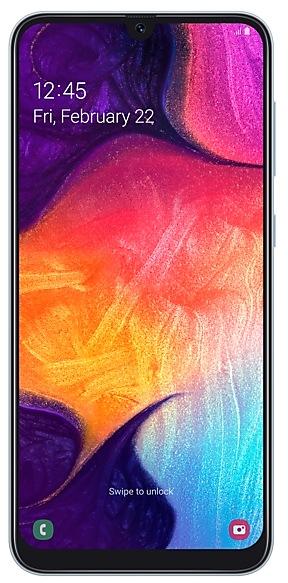
Samsung Galaxy A50 A505FDDS3ASK5
SM-A505F 4 countries Android 9 (Pie)

Samsung Galaxy A50 A505FDDS3ASK5 Firmware

Samsung Galaxy A50 A505FDDS3ASK5 is an Android 9 (Pie) firmware for 4 countries, 4 CSC codes. It is the same firmware configured per region and carrier (CSC). Find your country below, verify the file and download for free. Compared with the previous build A505FDDU3ASK2, Android and the bootloader binary are unchanged, so you can switch between the two in both directions. A newer build for SM-A505F is available: A505FDDS9CWA2.

9.3/10 (469)17,724 times
Android 9 (Pie)
OS Version
2019-11-06
Build Date
2019-11-01
Security patch
4
Countries
4
CSC codes
3
Bootloader binary

Bootloader binary 3. Flashing firmware with a lower binary is usually blocked by Samsung anti-rollback.

Newer builds of Samsung Galaxy A50 use bootloader binary 9 (latest: A505FDDS9CWA2). If your device already runs binary 9, this build cannot be flashed.

All regional downloads

Pick your region (CSC) to download the matching firmware package.

Paste your current build number from Settings > About phone (About tablet) > Software information, or the output of *#1234#.
    MODEM/CP Version: A505FXXS3ASK5
    ModelRegionCSC VersionRelease dateSizeFile nameDownload
    SM-A505F
    BKD Bangladesh
    INS India
    NPB Nepal
    SLK Sri Lanka
    A505FODM3ASK5 2019-11-11 4.111 GiB
    SM-A505F_1_20210219180435_m1y217sgq8_fac.zip

    No matching downloads

    Device specifications

    • Display diagonal16.3 cm (6.4")
    • Display resolution1080 x 2340 pixels
    • Display typeSAMOLED
    • Processor frequency2.3 GHz
    • RAM4 GB
    • Rear camera resolution25 MP
    • Rear camera typeTriple camera
    • SIM cardsDual SIM
    • Battery capacity4000 mAh
    • Weight166 g

    What's new in A505FDDS3ASK5

    · Improved fingerprint recognition algorithm
    ※ For better recognition, we recommend that you remove your fingerprints and register them again.

    · The security of your device has been improved.

    How to flash A505FDDS3ASK5

    • A505FDDS3ASK5 has bootloader binary 3. Your device must run binary 3 or lower: it is the 5th character from the end of your current build number.
    • CSC: Use CSC for a clean install, to change the region (CSC code), to downgrade or to repair a device that does not boot.
    • HOME_CSC: Use HOME_CSC to update the same model and region while keeping your data. Back up anyway: a failed update can still require a reset.
    • The Download Mode key combo depends on the model: see all combos.
    Full flashing guide
    Beware: Manually flashing firmwares may brick your device. Use it at your own risk and follow our tutorial steps.

    Frequently Asked Questions

    A505FDDS3ASK5 is Android 9 (Pie) firmware for Samsung Galaxy A50, released for 4 countries, 4 CSC codes. It includes the 2019-11-01 security patch. Samsung built it on 2019-11-06.

    No. A newer build for SM-A505F is available: A505FDDS9CWA2. Install it instead of A505FDDS3ASK5 unless you need this exact version. The previous build was A505FDDU3ASK2.

    Download the package for your region (CSC) and unzip it. In Odin, load each file into the slot with the same name: BL, AP, CP (if the package has one) and CSC, or HOME_CSC to keep your data. Odin checks the built-in checksum of every .tar.md5 file before flashing. The download is 4.111 GiB; keep about twice that free on the computer to unzip it. The Samsung Galaxy A50 must be on bootloader binary 3 or lower.

    This build uses bootloader binary 3. It can be flashed on a Samsung Galaxy A50 running binary 3 or lower; if the device already has a higher binary, Odin stops with "SW REV CHECK FAIL". 5 other builds of this model use the same binary, so you can switch between them in both directions.

    Other builds and changelog for Samsung Galaxy A50

    · The security of your device has been improved.

    · The security of your device has been improved.

    · The security of your device has been improved.

    • Overall stability of your device has been improved.
    • The security of your device has been improved.

    · The security of your device has been improved.

    Show 15 older builds

    • Overall stability of your device has been improved.
    • The security of your device has been improved.

    · The security of your device has been improved.

    • The security of your device has been improved.

    • Overall stability of your device has been improved.
    • The security of your device has been improved.

    · The security of your device has been improved.

    • The security of your device has been improved.

    · The security of your device has been improved.

    · The security of your device has been improved.

    • The security of your device has been improved.

    · The security of your device has been improved.

    • The security of your device has been improved.

    · The security of your device has been improved.

    • The security of your device has been improved.

    · The security of your device has been improved.

    • The security of your device has been improved.