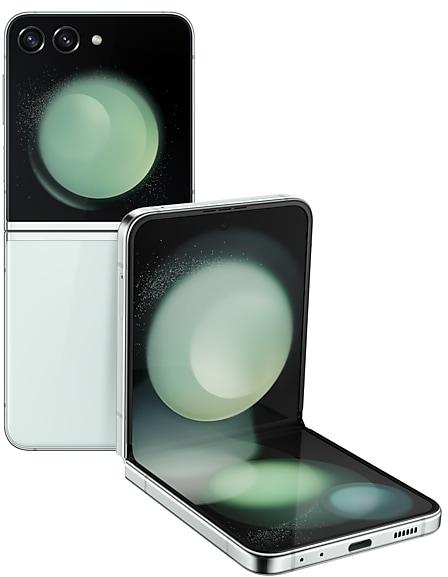
Samsung Galaxy Z Flip5 F7310ZCU4DXHA Firmware
Samsung Galaxy Z Flip5 F7310ZCU4DXHA is an Android 14 firmware for China (CHC). It is the same firmware configured per region and carrier (CSC). Find your country below, verify the file and download for free. Compared with the previous build F7310ZSU4DXHA https://samfirm.shop/build/F7310ZSU4DXHA, Android and the bootloader binary are unchanged, so you can switch between the two in both directions. A newer build for SM-F7310 is available: F7310ZSU9HZIJ https://samfirm.shop/build/F7310ZSU9HZIJ.
Bootloader binary 4. Flashing firmware with a lower binary is usually blocked by Samsung anti-rollback.
All regional downloads
Pick your region (CSC) to download the matching firmware package.
Device specifications
- Launched withAndroid 13
- Display diagonal17 cm (6.7")
- Display resolution2640 x 1080 pixels
- RAM8 GB
- Rear camera resolution12 MP
- Rear camera typeDual camera
- Battery capacity3700 mAh
- Weight187 g
Specifications of SM-F731B, a regional variant of the same device. Chipset and SIM lines are left out: they can differ by region.
What's new in F7310ZCU4DXHA
Turn simple sketches into awesome images
Start with a simple drawing, choose your style, and let Galaxy AI transform it into a captivating work of art. Sketch to image is available in Samsung Notes, and the Edge panels.
Create unique portraits
With a wide variety of AI-generated portrait styles, you can create a whole new look for your own profile image in Contacts or someone else’s, or use Photo Editor to invent something new for your photos that have faces in them.
Let your phone do the writing for you
When you need to write something, whether it’s a text, an email, or a social media post, you can start by giving Samsung Keyboard's new Composer a short request or snippet of text, then let Galaxy AI do the rest.
Translate calls in more apps
Simply talk over the phone and get translation in real time, helping you break down language barriers. And now, in addition to the Samsung Phone app, you can get real-time translation in supported voice calling apps like WeChat. During a call, tap Live translate in the quick panel to start translating.
Translate image text on webpages
Get the entire webpage in your language. When you translate a webpage in Samsung Internet, all of the text on the page gets translated, whether it’s formatted as text or part of an image.
Translate in Listening mode
Listen in, no matter which language is being spoken. Interpreter's new Listening mode lets you translate one-way communication, like a lecture or presentation, into your language.
Turn voice recordings into notes
It’s easier than ever before to create notes with Samsung Notes, even using just your voice. You can now transcribe voice recordings into text notes that you can edit, summarize, and more.
Translate and summarize PDFs
Note assist's translation and summary features now work with PDF files without the need to convert them to notes first. Translated text will appear in the original format of the PDF.
Auto detect languages in Voice Recorder
Use Transcript assist to convert recordings of meetings, lectures, voice memos, and more into text. The language of your recording will now be automatically detected, so you can skip the language choice and go right to the transcript.
Edit voice recordings and transcripts
After you create a transcript in Voice Recorder, you can now edit the text to fix any errors, remove unneeded parts, or add something that’s missing.
Zoom more easily
Navigating between lenses is now a snap. Tap the lens toggle button to switch lenses.
Quick access to your sleep and energy scores
New widgets let you check your sleep and energy scores from Samsung Health on the cover screen without opening your phone.
More wallpaper options
The cover screen wallpaper library has been expanded with a variety of new fun and informative content.
Style suggestions
Get suggestions for making your cover screen look its best. When you set a custom wallpaper, just tap Suggest a style.
More widget options
Access essential information on your cover screen with new widgets available in a variety of sizes. In addition to full-screen 4x4 widgets, smaller 4x2 and 2x2 widgets are now available. New widgets are available for Weather, Clock, Calendar, Reminder, Calculator, Voice Recorder, and Samsung Health.
Eye-catching notifications
Make your notifications stand out. The same edge lighting and notification pop-up styles available on the main screen are now also available on the cover screen.
Quick access to accessibility shortcuts
Use accessibility shortcuts even when your phone is closed. Accessibility shortcuts are now available on the cover screen in addition to the main screen.
Bring photos to life with Live effects
Give your subjects a lifelike appearance by applying live effects to people and animals in your photos.
Automatic zoom in Flex mode
Get perfect shots in Flex mode with automatic zoom adjustments powered by AI. Auto zoom adapts to your subject's distance for optimal framing.
Quickly save and share Instant slow-mo clips
After watching a video in instant slow-mo, you can save the portion of the video that you slowed down. When you share a video, the last section you watched in slow-mo is also available for sharing.
Refined zoom control in camcorder mode
Capture cinematic footage with finesse. Open your phone in flex mode and hold it like a camcorder. While recording video in camcorder mode, you can fine-tune the zoom level with a slider.
Create fun animated stickers and GIFs
Touch and hold the object from a motion photo to clip it, then instantly turn it into an animated sticker or GIF that you can share with others.
Clip just what you need
Touch and hold a person or object in photo to clip it. You can now clip one or multiple items. After clipping, you can easily turn your selection into a sticker or copy and paste it somewhere else.
Discover new insights and stay motivated
Stay inspired throughout your health experience with new wellness tips in Samsung Health. Wellness tips offer valuable insights and encouragement to help you achieve your health goals.
Get more detailed sleep analysis
New sleep insights give you more detailed and accurate analysis of your sleep quality. Your comprehensive sleep report now includes your heart rate, respiratory rate, and the amount of time it takes you to fall asleep after you lie down.
Make your own workout routines
Combine a series of different exercises together for a custom workout routine. You can set targets for sets, reps, time, and more. After you start your routine, your watch can automatically switch to the next exercise when you meet your target. You can optionally add breaks in between exercises. When your routine is finished, you can view your results for the entire routine all in one place.
Connect cycling power meters
Get more useful data from your cycling workouts. Samsung Health now supports connecting to cycling power meters attached to your bike. A power meter allows you to track your functional threshold power (FTP) to give you more insights into your training.
Suggested actions for Smart select
Take action quickly based on what's shown on your screen. When you select something on your screen with Smart select, you'll now get suggested actions related to your selection. You can quickly call phone numbers, locate addresses, and more. Smart select can now be accessed in the Apps Edge panel.
Enhanced multi window experience
It's easier than ever to switch between picture-in-picture and split screen. Touch and hold a video playing in picture-in-picture, then drag it to the side of the screen where you want to play it.
Easier file copying and moving
It's easier than ever to find the right folder when copying or moving files in My Files. You can now choose the destination folder in a pop-up window so you can easily return the original folder when you're finished.
Create file shortcuts on the Home screen
Get faster access to the files you use most. Touch and hold any file in My Files, then use your other hand to navigate to the Home screen. Drop the file anywhere on your Home screen to create a shortcut to the file.
Improved thumbnail image display
See how images will appear before you open them. Thumbnail images for pictures and videos in My Files now appear in the original aspect ratio.
Easier lunar calendar event repetition
It's simpler than ever before to add lunar birthdays and other repeating events to your calendar. New repetition options let you make an event repeat based on the lunar calendar even if you didn’t tap the button to switch the event to the lunar calendar.
Automate your watch with modes and routines
Modes you set up on your phone, such as Sleep mode, Exercise mode, or Theater mode, can now automatically control more of your watch's settings based on what you’re doing or where you are. In addition to Watch faces and Do not disturb, modes can now also control Always On Display, Raise wrist to wake, Touch screen to wake, Turn bezel to wake, Sound mode, and Disconnection alerts. You can also use routines to control these watch actions.
More message filtering options
When you create a routine that starts when you receive a message or notification, you now have more fine-tuned control. You can add multiple keywords and choose to start the routine when all keywords are included or when any keyword is included in the message or notification.
Design and share your profile card
Design your own profile card with your name and picture that other Galaxy users can see when you call them or when they view your contact info. You can also create profile cards for other people in your contacts so you can see their card when they call you.
Skim through videos quickly
Save time and effort with new video seek controls in the Video Player app. Double tap the right side of the screen to go forward 5 seconds. Double tap the left side of the screen to go back 5 seconds.
Answer calls with a tap instead of a swipe
If you have difficulty swiping, you can set your phone to answer calls with a simple tap of a button.
Answer all calls using the speaker
Enjoy easier hands-free calls. If you prefer taking calls on the speaker, a new setting lets you answer all calls on the speaker by default instead of manually switching for each call.
Extra-strong security
If you have special security needs, you can now set Auto Blocker to apply maximum restrictions to get the highest level of protection against malware and security threats. Hyperlinks and automatic downloading attachments in messages are blocked, location data is removed when sharing pictures, and shared albums in Gallery can't be used.
Enhanced Assistant menu
You can now open the quick panel with just one tap. You also have greater control of physical buttons. Use the Assistant menu to press and hold or double press the Side button.
How to flash F7310ZCU4DXHA
- Install Samsung USB Drivers:Download Official Drivers
- Download Odin Flash Tool:
- F7310ZCU4DXHA has bootloader binary 4. Your device must run binary 4 or lower: it is the 5th character from the end of your current build number.
- CSC: Use CSC for a clean install, to change the region (CSC code), to downgrade or to repair a device that does not boot.
- HOME_CSC: Use HOME_CSC to update the same model and region while keeping your data. Back up anyway: a failed update can still require a reset.
- The Download Mode key combo depends on the model: see all combos.
Frequently Asked Questions
Other builds and changelog for Samsung Galaxy Z Flip5
Interpreter keeps your conversation in front of you
In conversation mode, you can scroll through the whole conversation while you’re still talking.
Open more apps on the cover screen
Swipe up on the cover screen to view available apps and choose the one you want to open. You can also make more apps available for use on the cover screen using Good Lock.
Switch apps on the cover screen
You can now open the Recents screen on the cover screen to swit...
• Security
The device is protected with improved security.
These changes may vary depending on the model, country, or network operator of the customer environment.
• Security
The device is protected with improved security.
These changes may vary depending on the model, country, or network operator of the customer environment.
Show 15 older builds
• Security
The device is protected with improved security.
These changes may vary depending on the model, country, or network operator of the customer environment.
• Security
The device is protected with improved security.
These changes may vary depending on the model, country, or network operator of the customer environment.
• Security
The device is protected with improved security.
These changes may vary depending on the model, country, or network operator of the customer environment.
• Security
The device is protected with improved security.
These changes may vary depending on the model, country, or network operator of the customer environment.
• Security
The device is protected with improved security.
These changes may vary depending on the model, country, or network operator of the customer environment.
• Security
The device is protected with improved security.
These changes may vary depending on the model, country, or network operator of the customer environment.
• Security
The device is protected with improved security.
These changes may vary depending on the model, country, or network operator of the customer environment.