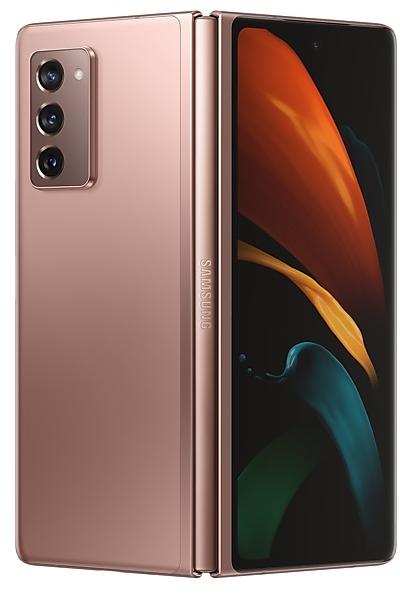
Samsung Galaxy Z Fold2 5G F9160ZCU2EUI1 Firmware
Samsung Galaxy Z Fold2 5G F9160ZCU2EUI1 is an Android 11 firmware for China (CHC). It is the same firmware configured per region and carrier (CSC). Find your country below, verify the file and download for free. Compared with the previous build F9160ZCU1DUG7: bootloader binary raised from 1 to 2, so after installing it there is no way back to older builds; security patch 2021-08-01 instead of 2021-07-01. A newer build for SM-F9160 is available: F9160ZCU8JZE1.
Bootloader binary 2. Flashing firmware with a lower binary is usually blocked by Samsung anti-rollback.
All regional downloads
Pick your region (CSC) to download the matching firmware package.
Device specifications
- Launched withAndroid 10.0
- Display diagonal19.3 cm (7.6")
- Display resolution2208 x 1768 pixels
- Display typeDynamic AMOLED 2X
- RAM12 GB
- Rear camera resolution12 MP
- Rear camera typeTriple camera
- Battery capacity4500 mAh
- Weight282 g
Specifications of SM-F916B, a regional variant of the same device. Chipset and SIM lines are left out: they can differ by region.
What's new in F9160ZCU2EUI1
One UI 3.1.1 for Galaxy Z Fold takes your productivity to the next level. Multitasking is easier than ever with enhanced multi-window and task-switching features. We've also optimized more apps to take advantage of the large screen, helping get more done. Explore these exciting new additions that make your Galaxy Z Fold easier and more fun to use.
Scroll down for a full list of changes.
Multi window
• Touch and hold text, a link, or a file in Notes, My Files, Messages, or Samsung Internet, then drag it to the edge of the screen to open it in split screen or a pop-up window.
• Arrange your open apps into multi window configurations so you can see more at once.
Home screen
• Keep your Home screen layout in sync between the cover and main screens. Changes in one place are reflected in the other.
Edge panels
• The background screen is no longer blurred when you open edge panels.
Camera
• Use Capture View to review up to 3 pictures or videos on the screen at once and scroll through up to 100 recent shots. You can compare, zoom in on, delete, and share shots without ever leaving Camera.
• Preview filters and face effects on the main screen and cover screen when using Dual Preview. That way, both the photographer and the subject can see exactly how every shot’s going to look.
• Use Dual preview to preview AR Emoji Camera and AR Doodle videos on both the main screen and cover screen.
• Record AR Doodle videos in 9:16, 1:1, and full screen to show them off in a variety of different places.
Settings
• Split-screen view is now supported on the main screen.
Labs
Try experimental features to get more out of the large screen and Flex mode.
• Open all apps in split screen or pop-up view and customize app aspect ratios in full screen.
• Rotate any app to portrait or landscape, even if it’s not normally supported.
• Use Flex mode with more apps when your phone is partially folded.
• Pin the Apps edge panel to the screen as a taskbar for quick app switching.
Additional large screen improvements
• When you leave the Clock app while a timer is running, a mini timer will appear on top of other apps so you can keep track of how much time is remaining.
• Navigation rail has been added to several apps to give you more space for primary content. (Reminder, Calendar, My files, Tips, Weather)
• Secondary apps can be opened in small overlay windows to keep you focused on your main task. (Phone, Contacts, Gallery)
Some apps will need to be updated separately after the One UI 3.1.1 update.
After updating, you will not be able to downgrade to the old software because of updates to the security policy.
How to flash F9160ZCU2EUI1
- Install Samsung USB Drivers:Download Official Drivers
- Download Odin Flash Tool:
- F9160ZCU2EUI1 has bootloader binary 2. Your device must run binary 2 or lower: it is the 5th character from the end of your current build number.
- CSC: Use CSC for a clean install, to change the region (CSC code), to downgrade or to repair a device that does not boot.
- HOME_CSC: Use HOME_CSC to update the same model and region while keeping your data. Back up anyway: a failed update can still require a reset.
- The Download Mode key combo depends on the model: see all combos.
Frequently Asked Questions
Other builds and changelog for Samsung Galaxy Z Fold2 5G
• Stability and reliability
Device behavior has been improved.
These changes may vary depending on the model, country, or network operator of the customer environment.
• Stability and reliability
Device behavior has been improved.
These changes may vary depending on the model, country, or network operator of the customer environment.
• Stability and reliability
Device behavior has been improved.
These changes may vary depending on the model, country, or network operator of the customer environment.