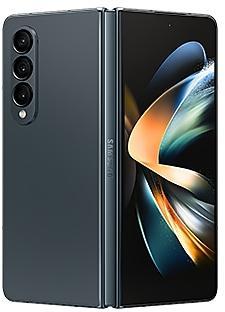
Samsung Galaxy Z Fold4 F936USQU3DWH5 Firmware
Samsung Galaxy Z Fold4 F936USQU3DWH5 is an Android 13 firmware for CHA, United States (CCT, TMB, TMK, VZW). It is the same firmware configured per region and carrier (CSC). Find your country below, verify the file and download for free. Compared with the previous build F936USQS3CWFB: security patch 2023-08-01 instead of 2023-07-01. A newer build for SM-F936U is available: F936USQSAIZH2.
Bootloader binary 3. Flashing firmware with a lower binary is usually blocked by Samsung anti-rollback.
All regional downloads
Pick your region (CSC) to download the matching firmware package.
No matching downloads
Device specifications
- Display diagonal19.3 cm (7.6")
- Display resolution2176 x 1812 pixels
- RAM12 GB
- Rear camera resolution50 MP
- Rear camera typeTriple camera
- Battery capacity4400 mAh
- Weight263 g
Specifications of SM-F936B, a regional variant of the same device. Chipset and SIM lines are left out: they can differ by region.
What's new in F936USQU3DWH5
Better app previews on the Recents screen
The Recents screen now shows apps as they will appear after you open them. You can easily see if an app is opened in split screen, full screen, or as a pop-up.
Easily switch from pop-up view to split screen
Press and hold the handle at the top of the pop-up window, then drag the app to the side of the screen where you want it to be shown.
Restore pop-ups snapped to the edge of the screen
Drag an app in pop-up view to the edge of the screen to snap it to the edge and keep it out of the way. When you need it again, tap anywhere on the pop-up to bring it back to its previous location.
Check minimized apps with the S Pen
Hover your S Pen above a floating app icon to see a preview of how the app will appear when you open it.
More recent apps
You can now choose how many recently used apps to show on the taskbar (up to 4).
Easier navigation
When fewer than 8 icons are shown on the taskbar, the navigation area will automatically resize to give you more space for the navigation buttons.
Use the Flex mode panel with more apps
More apps can now be used with the Flex mode panel. When the Flex mode panel is turned on, just fold your phone upright and tap the button that appears on the navigation bar.
Improved media controls
Buttons for skipping forward and backward 10 seconds are now available on the Flex mode panel. When you touch the time bar, the time you'll move to will be shown to help you find the right moment.
Customize the toolbar
Create your own personal layout to quickly access features like split screen view, screen capture, and more. Touch and hold an icon on the Flex mode panel toolbar to reorder the icons or move icons into or out of the toolbar.
Share with contacts
You can now send files to your contacts anytime, even if they're not near you.
Share files privately
Protect private content when you share it. You can set expiration dates for the files you send, cancel sharing at any time, and prevent recipients from saving or resharing.
Improved sleep coaching
New coaching content and layouts make it easier to check your progress and build better sleeping habits. (Requires Galaxy Watch4 or newer)
More meaningful sleep data
Screen layout and explanations have been enhanced to make it easier to check and understand each sleep factor. (Requires Galaxy Watch4 or newer)
Measure your skin temperature during sleep
See how your skin temperature changes throughout the night to help you create a more comfortable sleep environment. (Requires Galaxy Watch5 or newer)
Better workout summaries
New workout summaries help you focus on meaningful information from your exercise.
Stay on track to meet your goals
Rewards, badges, and personal best records have been enhanced to keep you motivated and help you meet your health goals.
More date and time styles for watermarks
Customize the date and time separately with more style options to get the perfect look for your watermark.
Enhanced Flex Mode layout for Pro modes
When your phone is folded upright, manual settings for Pro and Pro video modes will appear on the bottom of the screen so you can easily control ISO, shutter speed, and other settings.
Select multiple pictures in Capture view
While using Capture view on the main screen, you can now press and hold to select multiple pictures. After selecting, you can share or delete them all at once.
Enhanced remaster previews
Thumbnail images are now shown below the image you're remastering. Tap a thumbnail to compare the remastered image to the original with a larger view.
Apply effects more easily
Filter and tone effects in Gallery now use a dial instead of a slider making it easier to make precise adjustments with just one hand.
Copy and paste effects
You can now copy and paste filters and tones from one picture you’ve edited to another.
Drag and drop with two hands
Start dragging files, app icons, or other items with one hand, then use your other hand to navigate to the folder or location where you want to drop them. Supported in My Files and the Home screen.
Continue using your phone while charging another device
Open your phone with the main screen facing down. You can charge your Galaxy Buds, Galaxy Watch, or another device using wireless power sharing on one side. At the same time, you can continue using your phone with the cover screen on the other side.
Listen to Auracast broadcasts
Use your phone to find and listen to nearby Auracast broadcasts with your Galaxy Buds2 Pro or other devices that support Bluetooth LE Audio.
Keep storage space available
When you’re running low on space in your internal storage, app cache information will be shown when you analyze storage in My Files. Clearing app caches can help you free up space without deleting files or apps.
Enhanced memory management in Device care
More information is provided about apps using memory on your phone, giving you the option to put apps to sleep if too much memory is being used.
Change your mode from the Lock screen
Change between Sleep mode, Driving mode, and other modes directly from the Lock screen.
Customize your layout in Samsung Internet
When you choose to show the address bar at the bottom of the screen, the tab bar and bookmark bar will also be shown at the bottom.
How to flash F936USQU3DWH5
- Install Samsung USB Drivers:Download Official Drivers
- Download Odin Flash Tool:
- F936USQU3DWH5 has bootloader binary 3. Your device must run binary 3 or lower: it is the 5th character from the end of your current build number.
- CSC: Use CSC for a clean install, to change the region (CSC code), to downgrade or to repair a device that does not boot.
- HOME_CSC: Use HOME_CSC to update the same model and region while keeping your data. Back up anyway: a failed update can still require a reset.
- The Download Mode key combo depends on the model: see all combos.
Frequently Asked Questions
Other builds and changelog for Samsung Galaxy Z Fold4
• Security
The device is protected with improved security.
These changes may vary depending on the model, country, or network operator of the customer environment.
• Security
The device is protected with improved security.
These changes may vary depending on the model, country, or network operator of the customer environment.
• Security
The device is protected with improved security.
These changes may vary depending on the model, country, or network operator of the customer environment.
• Security
The device is protected with improved security.
These changes may vary depending on the model, country, or network operator of the customer environment.
• Security
The device is protected with improved security.
These changes may vary depending on the model, country, or network operator of the customer environment.
Show 15 older builds
• Security
The device is protected with improved security.
These changes may vary depending on the model, country, or network operator of the customer environment.
• Security
The device is protected with improved security.
These changes may vary depending on the model, country, or network operator of the customer environment.
• Security
The device is protected with improved security.
These changes may vary depending on the model, country, or network operator of the customer environment.
• Security
The device is protected with improved security.
These changes may vary depending on the model, country, or network operator of the customer environment.
• Security
The device is protected with improved security.
These changes may vary depending on the model, country, or network operator of the customer environment.
Check stock prices without unlocking
Stocks you follow on Google Finance with big price changes will appear on your Now bar at the end of the trading day.
Easier file sharing with Quick Share
It's never been easier to send and receive files. Tap the Quick Share button in quick settings to get started. You can receive files while the Quick Share screen is open and send files to others directly from Quick Share.
Sticky notes
Add quick annotations on top o...
• Security
The device is protected with improved security.
These changes may vary depending on the model, country, or network operator of the customer environment.
• Security
The device is protected with improved security.
These changes may vary depending on the model, country, or network operator of the customer environment.
• Security
The device is protected with improved security.
These changes may vary depending on the model, country, or network operator of the customer environment.
• Security
The device is protected with improved security.
These changes may vary depending on the model, country, or network operator of the customer environment.
Visual enhancements
Enjoy a more sophisticated and unique look. One UI 7 introduces a stunning redesign to key components including buttons, menus, notifications and control bars, providing a more consistent visual experience with curves and circles. Beautiful new colors, soft animations, and an innovative blur effect that's unique to One UI make information hierarchy clearer and help you focus on important information.
Reimagined Home screen
Fr...