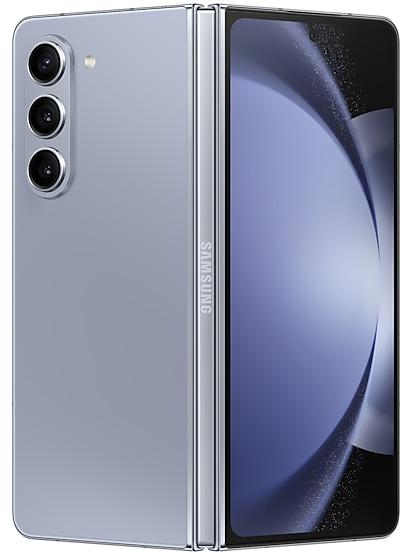
Samsung Galaxy Z Fold5 F946WVLS3CXE3 Firmware
Samsung Galaxy Z Fold5 F946WVLS3CXE3 is an Android 14 firmware for Canada (BMC, BWA, CHR, ESK, FMC, GLW, KDO, PCM, PMB, RWC, SOL, TLS, VMC, VTR, XAC), FIZ, TBT. It is the same firmware configured per region and carrier (CSC). Find your country below, verify the file and download for free. Compared with the previous build F946WVLS2CXCI: bootloader binary raised from 2 to 3, so after installing it there is no way back to older builds; security patch 2024-05-01 instead of 2024-04-01. A newer build for SM-F946W is available: F946WVLU8HZIJ.
Bootloader binary 3. Flashing firmware with a lower binary is usually blocked by Samsung anti-rollback.
All regional downloads
Pick your region (CSC) to download the matching firmware package.
Device specifications
- Launched withAndroid 13
- Display diagonal19.3 cm (7.6")
- Display resolution2176 x 1812 pixels
- RAM12 GB
- Rear camera resolution50 MP
- Rear camera typeTriple camera
- Battery capacity4400 mAh
- Weight253 g
Specifications of SM-F946B, a regional variant of the same device. Chipset and SIM lines are left out: they can differ by region.
What's new in F946WVLS3CXE3
• The security of your device has been improved.
How to flash F946WVLS3CXE3
- Install Samsung USB Drivers:Download Official Drivers
- Download Odin Flash Tool:
- F946WVLS3CXE3 has bootloader binary 3. Your device must run binary 3 or lower: it is the 5th character from the end of your current build number.
- CSC: Use CSC for a clean install, to change the region (CSC code), to downgrade or to repair a device that does not boot.
- HOME_CSC: Use HOME_CSC to update the same model and region while keeping your data. Back up anyway: a failed update can still require a reset.
- The Download Mode key combo depends on the model: see all combos.
Frequently Asked Questions
Other builds and changelog for Samsung Galaxy Z Fold5
Interpreter keeps your conversation in front of you
In conversation mode, you can scroll through the whole conversation while you’re still talking.
More customizable quick panel
You can now rearrange and customize the controls in your quick panel even more than before. You can change the size of the brightness and volume sliders as well as the media player. You can also separate the sound mode button from the volume slider.
Easier multi-w...
• Security
The device is protected with improved security.
These changes may vary depending on the model, country, or network operator of the customer environment.
• Security
The device is protected with improved security.
These changes may vary depending on the model, country, or network operator of the customer environment.
• Security
The device is protected with improved security.
These changes may vary depending on the model, country, or network operator of the customer environment.
Fresh new look
One UI seamlessly integrates into your daily routine by combining immersive visuals with meaningful personalization for a more refined and sophisticated design. Transparent blur effects add depth and make content easier to navigate, while floating elements react organically to your workflow for a more focused experience. Through familiar and intuitive data visualization, One UI delivers a design that feels both personal and relatable, helping you focus...
Show 15 older builds
• Security
The device is protected with improved security.
These changes may vary depending on the model, country, or network operator of the customer environment.
• Security
The device is protected with improved security.
These changes may vary depending on the model, country, or network operator of the customer environment.
• Security
The device is protected with improved security.
These changes may vary depending on the model, country, or network operator of the customer environment.
• Security
The device is protected with improved security.
These changes may vary depending on the model, country, or network operator of the customer environment.
• Security
The device is protected with improved security.
These changes may vary depending on the model, country, or network operator of the customer environment.
• Security
The device is protected with improved security.
These changes may vary depending on the model, country, or network operator of the customer environment.
See calls on the screen
Call captions show what each person says on the screen in real time during calls. Follow the conversation on your screen to make sure you don’t miss anything.
Create unique pet portraits
Bring out your pet's personality with Portrait studio. You can now apply portrait effects to pictures of dogs and cats in addition to people. Choose from styles like Fisheye lens, oil painting, and more.
View original and edited versions side-by-sid...
• Security
The device is protected with improved security.
These changes may vary depending on the model, country, or network operator of the customer environment.
• Security
The device is protected with improved security.
These changes may vary depending on the model, country, or network operator of the customer environment.
• Security
The device is protected with improved security.
These changes may vary depending on the model, country, or network operator of the customer environment.
Write like a pro
Let Galaxy AI help you with writing tasks by tapping the 4-star icon that appears whenever you select text. You can correct spelling and grammar, change tone, summarize, or apply formatting. You can even start with a short snippet and let the AI do the writing for you.
Transcribe and summarize recorded calls
It's easier than ever to review the content of your recorded calls in the Samsung Phone app. You can view the entire conversat...