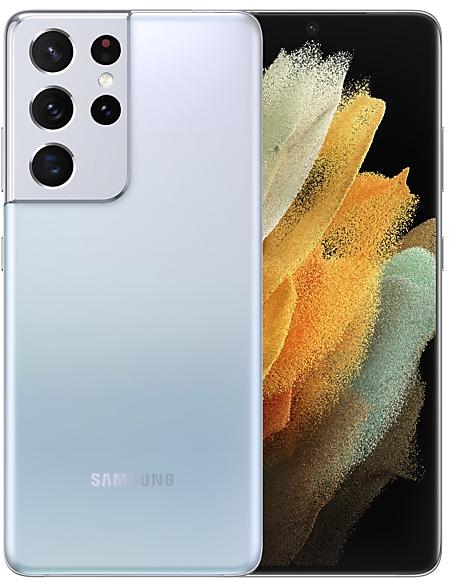
Samsung Galaxy S21 Ultra 5G G998BXXUEHYD5 Firmware
Samsung Galaxy S21 Ultra 5G G998BXXUEHYD5 is an Android 15 firmware for 77 countries, 165 CSC codes. It is the same firmware configured per region and carrier (CSC). Find your country below, verify the file and download for free. Compared with the previous build G998BXXSEGYA4: Android updated from Android 14 to Android 15; security patch 2025-04-01 instead of 2025-02-01. A newer build for SM-G998B is available: G998BXXUJHZF2.
Bootloader binary E (14). Flashing firmware with a lower binary is usually blocked by Samsung anti-rollback.
All regional downloads
Pick your region (CSC) to download the matching firmware package.
No matching downloads
Device specifications
- Launched withAndroid 11
- Display diagonal17.3 cm (6.8")
- Display resolution3200 x 1440 pixels
- Display typeDynamic AMOLED 2X
- Processor frequency2.9 GHz
- Processor familySamsung Exynos
- RAM12 GB
- Rear camera resolution108 MP
- Rear camera typeQuad camera
- SIM cardsDual SIM
- Battery capacity5000 mAh
- Weight228 g
What's new in G998BXXUEHYD5
Visual enhancements
Enjoy a more sophisticated and unique look. One UI 7 introduces a stunning redesign to key components including buttons, menus, notifications and control bars, providing a more consistent visual experience with curves and circles. Beautiful new colors, soft animations, and an innovative blur effect that's unique to One UI make information hierarchy clearer and help you focus on important information.
Reimagined Home screen
Fresh new app icons will look great on your Home screen with new visual metaphors and color schemes that make it easier to recognize the app you need. Widgets have been completely redesigned with more colorful images and more consistent layouts. Folders on your Home screen can also be made larger so you can instantly access apps without opening the folder first.
Simplified Home screen grid
Your Home screen now looks even better than before. A new standard grid layout keeps things symmetrical and makes it easier to use One UI widgets in standard sizes.
Improved Home screen landscape view
Get a more consistent look for your Home screen, even when using your phone horizontally. Widgets now have a similar aspect ratio in landscape view, and text labels appear below icons instead of beside them.
Customize your app and widget style
Make your Home screen look just the way you like it. You can now adjust the size of app icons and choose whether or not to show text labels below app icons and featured widgets. You can also adjust shape, background color, and transparency in the settings for each widget.
Stay on top of important tasks with the Now bar
Check the information you need right now and start essential features without unlocking your phone. Ongoing tasks will appear in the Now bar at the bottom of your Lock screen so you can check key information quickly. Information includes media controls, Stopwatch, Timer, Voice Recorder, Samsung Health, and more.
Make your clock look just the way you like it
Discover a variety of new clock styles for your Lock screen. You can adjust the thickness of lines in the default clock style, or try one of the new animated clocks to match your tastes. You can also resize your clock to any size you like and drag it to your desired position on the Lock screen.
More widgets and shortcuts
You can now see more and do more even when your phone is locked. Add a widget to show pictures and stories from your Gallery, or try a shortcut that opens the QR code scanner with a quick swipe.
Separate notification and quick panels
Instantly access the panel you need with more space for quick settings. Swipe down from the top right corner of the screen to open the quick settings panel. Swipe down from anywhere else on the top of the screen to open the notification panel.
Customize your quick panel
Create the quick panel layout that's right for you. You can tap the pencil icon at the top of the quick panel to enter Edit mode, then move buttons and controls up and down to match your preferences.
Live notifications
Stay on top of what's happening right now. Live notifications show you the progress of ongoing activities like timers, voice recordings, exercises, and more so you can take quick actions related to them. Live notifications will appear in the Now bar on the Lock screen, on the status bar, and at the top of the notification panel.
New notification layout
Icons on notifications are now the same as the icon that appears on your Home screen, making it easy to recognize which app sent each notification. Grouped notifications appear as a stack of cards. Tap a stack to show all notifications in the group.
Press and hold the Side button to access Google Gemini
The Side button is a new way to access Google Gemini or other digital assistant app quickly instead of using the corner swipe. You can change what the Side button does in Settings.
Complete multiple tasks with one ask
Google Gemini is now seamlessly integrated with Samsung apps such as Calendar, Notes, Reminder, and Clock. You can complete tasks in these apps using information from Gemini with one simple command. Try asking Google Gemini to ask about a YouTube video and save the result in Samsung Notes, or try asking Google Gemini to find your favorite sports team’s schedule and add the games to your calendar.
Circle it, find it. Hear it, find it
Circle to Search with Google allows you to search anything on your screen and get information faster with AI Overviews. Just circle an object—including images, videos, or text—and you'll get results immediately. You can even search for a song that you hear in the moment without switching apps.
New Camera layout
Camera buttons, controls, and modes have been reorganized to make it easier to find the features you need and to give you a clearer preview of the picture you're taking or the video you're recording.
Mode selection improvements
The More modes menu has been redesigned. Instead of filling the whole screen and blocking the camera view, you can now choose a mode from a small pop-up that only covers the bottom of the screen.
Enhanced zoom controls
It's now easier to choose the right zoom level. A 2x zoom button is now available by default, and additional zoom options appear after you select a lens.
Upgraded filter experience
Camera filters have been completely revamped. New filters are now available and existing filters have been improved. Each filter allows fine-tuned adjustments of intensity, color temperature, contrast and saturation, making it easier to get the look you want. You can also create custom filters based on the style and mood of pictures you choose.
Save exposure settings for each mode
Control how bright or dark your images are with the Exposure option in the camera quick controls. After you set the exposure for a mode, it will stay set in that mode even if you switch to a new mode and come back.
Improved Pro/Pro video modes
Pro and Pro video modes have a simplified layout that makes it easier to focus on the picture you're taking or the video you're recording. A new zoom control is available whenever you're recording in pro video mode that lets you control the zoom speed for smooth transitions. Mic controls in Pro video mode have been moved to quick controls.
Play audio while recording videos
You can now record videos without interrupting music, podcasts, or other audio content you’re listening to. Just turn on Audio playback in Advanced video options.
Line up the perfect shot
Get help adjusting the camera's position with grid lines and levels. Grid lines can now be turned on and off separately from the horizontal level. There's also a new option to show a vertical level.
Free-form collages
Go beyond the preset layouts for collages in Gallery. You can now adjust the size, position, and rotation of images in your collage to create your own unique layout.
Edit collages in stories
Make your story’s collage look just the way you like it. You now have full control to edit collages created in stories. Replace images, remove or add images, or adjust the position and size.
Easily undo your edits
Don't worry about making mistakes. Undo and Redo options are now available when editing videos for actions such as transformations, filters, and tone changes.
Animate your videos
Add fun animation effects to stickers and text in your videos in Studio. Choose from fade in, fade out, wipes, rotation, and more.
Stay mindful
The new Mindfulness feature in Samsung Health can help you manage stress and anxiety in your daily life. Keep track of your moods and emotions, practice breathing exercises and meditation, and more.
New Samsung Health badges
Stay motivated and work toward your health goals while earning new badges in Samsung Health. Challenge yourself to earn the new badges for energy score, exercise, activity, food, water, body composition, and more.
Previews for minimized apps
When multiple pop-up windows from the same app are minimized, they'll be combined into a single icon. Tapping the icon will show a preview of all open windows from the app, allowing you to easily select the window you want.
Group your alarms
Create groups of alarms that you want to control together in the Clock app. You can turn off all the alarms in one group with a single tap.
Keep all your alarms at the same volume
For simpler setup, all of your alarms will use the same volume by default. If you prefer to set different volumes for each alarm, you can choose this in Clock Settings.
Enhanced file selection
The new File Picker makes it easier to attach and select files in a variety of apps. It's easy to switch between different storage locations and categories, and previews are shown to make sure you get the right files.
Advanced options for routines
Program your phone to do almost anything you want. Routines are more powerful than ever before with If-Else logic and the ability to get data as variables.
Easily reschedule calendar events
Just drag and drop an event from one date to another on your calendar in Month view to change the event date.
Show separate calendars on widgets
You now have more control over which calendars appear on your calendar widgets. You can choose just one calendar and show only events from it on your Home screen, or create 2 separate calendar widgets with a different calendar on each one.
Count down the days to an important event
It's easier than ever to create a countdown widget for an event on your calendar. Go to the event details, then select Add countdown widget from the more options menu. A widget will appear on your home screen showing the number of days until your birthday, anniversary, vacation, or any other event that you choose.
Move all events from one calendar to another
Avoid the hassle of moving events one at a time. You can now move all events from one calendar to another, such as moving all events from the calendar on your phone to a cloud-based calendar.
More options for repeating reminders
When you create a repeating reminder, you can now choose multiple dates for repeating instead of just one.
Enhanced quick add menu
It's now easier to create reminders quickly. The quick add menu now provides preset options for time and location conditions.
Manage your completed reminders
It’s easier to clear out the clutter from your reminder list. A new setting lets you automatically delete completed reminders after a certain period of time. You can also duplicate completed reminders so you can reuse them without entering all of the information again.
Easily connect to nearby devices
It's easier than ever before to connect to other Samsung devices such as TVs, tablets, PCs, watches, earbuds, and more. Tap Nearby devices in the quick panel to see devices available near you, then drag a device to your phone to instantly connect. You can also tap on a device to see the features available when connected to your phone. For example, when you tap on a TV, you’ll see an option to start Smart View.
Recommended devices for Quick Share
Easily find the right device to share with. Devices signed in to your Samsung account and devices you've shared with in the past will appear at the top of the list so they're easy to find.
Continue sharing over the internet
Finish file transfers even when devices are far apart. When sharing files using Quick Share, if the devices become too far apart to continue a direct transfer, the transfer will continue seamlessly over the internet using Wi-Fi or mobile data.
Protect your data in case your phone is stolen
New theft protection features help protect your apps and data in case your phone is stolen. The screen will lock automatically if theft is detected or if your network connection is lost, or you can lock the screen manually by going to android.com/lock. You can also require biometric verification before changing sensitive settings.
Check the security status of your devices
Find out about security risks and solve them quickly. Knox Matrix monitors supported devices signed in to your Samsung account and lets you how to solve security risks if any are found.
Stay safe from security threats
Auto Blocker does even more to protect you from cyber attacks when Maximum restrictions is turned on. 2G networks are now blocked, and your phone won't automatically reconnect to non-secure Wi-Fi networks. These restrictions can help prevent an attacker from intercepting your network traffic.
More options for power saving
You now have more control over what happens when your phone is in Power saving mode. Choose exactly the features you want to limit to save the amount of battery that's right for you. You can even change these options while Power saving is on.
More control over battery protection
When you turn on Battery protection, you can now adjust the maximum charging level anywhere between 80% and 95%.
New charging effect
When you plug in a charger, the charging confirmation is smaller and appears at the bottom of the screen instead of the middle to prevent interruptions while still making it easy to check the charging status.
Zoom in and out with just one finger
Zooming in and out just got easier. For people who have difficulty using pinch zoom, you can now activate 1-finger zoom from the Assistant menu. Swipe up or right to zoom in. Swipe down or left to zoom out.
Enhanced screen controls
The Assistant menu now does even more to help you control the screen. You can now double tap and touch and hold just by tapping a single button. New scrolling controls let you move around the screen a specific distance by tapping the start and end points on the screen.
Customize your touch interactions
Get help choosing the settings that are most comfortable for you. New tests are available for the Touch and hold delay, Tap duration, and Ignore repeated touches settings. The test can tell you if your current settings are appropriate or need adjustments.
Get useful suggestions in Smart select
When you select part of the screen with Smart select, useful actions will be suggested based on what you selected. If event details are part of your selection, you’ll have an option to add it to your calendar. If you select an image, options for editing the image or improving its quality will be suggested.
Watch videos again
In Video Player, a button will appear at the end of each video that lets you start the video over again from the beginning.
Improved contacts list
For a more consistent experience, the same contact list now appears in both the Phone app and Contacts app. Menus and options are the same in both locations so you can always find what you're looking for. When searching for contacts, contacts you’ve searched for frequently appear at the top of the search results, helping you find the right person quickly.
Quickly add boarding passes to Samsung Wallet
When you view a supported airline or travel webpage that includes a boarding pass in Samsung Internet, a button will appear so you can add it to Samsung Wallet quickly and easily.
Activity forecasts
It's now easy to check if the weather is suitable for outdoor activities such as running, gardening, camping, and more. You can choose up to 3 activities to show in the Weather app.
Custom place labels
It's easier to keep track of different locations in the Weather app. You can now set custom labels to the locations you add, such as Home, Office, School, or any other place where you want to check the weather.
Boost your gaming
Game Booster's in-game panel has been redesigned, making it easier to change settings quickly without leaving the action.
Set performance for each game
Game Booster now lets you adjust performance settings separately for each game. You can set some games to high performance and others to save battery for longer gameplay time. Find the settings that work best for you.
End of support for downloading Edge panels
Edge panels can no longer be downloaded from the Galaxy Store in One UI 7. Edge panels that you’ve already downloaded can continue to be used.
How to flash G998BXXUEHYD5
- Install Samsung USB Drivers:Download Official Drivers
- Download Odin Flash Tool:
- G998BXXUEHYD5 has bootloader binary E (14). Your device must run binary E (14) or lower: it is the 5th character from the end of your current build number.
- CSC: Use CSC for a clean install, to change the region (CSC code), to downgrade or to repair a device that does not boot.
- HOME_CSC: Use HOME_CSC to update the same model and region while keeping your data. Back up anyway: a failed update can still require a reset.
- The Download Mode key combo depends on the model: see all combos.
Frequently Asked Questions
Other builds and changelog for Samsung Galaxy S21 Ultra 5G
• Stability and reliability
Device behavior has been improved.
These changes may vary depending on the model, country, or network operator of the customer environment.
• Security
The device is protected with improved security.
These changes may vary depending on the model, country, or network operator of the customer environment.
• Security
The device is protected with improved security.
These changes may vary depending on the model, country, or network operator of the customer environment.
• Security
The device is protected with improved security.
These changes may vary depending on the model, country, or network operator of the customer environment.
· Device stability improvements, bug fixes.
· New and / or enhanced features.
· Further improvements to performance.
Show 15 older builds
Visual enhancements
Enjoy a more sophisticated and unique look. One UI 7 introduces a stunning redesign to key components including buttons, menus, notifications and control bars, providing a more consistent visual experience with curves and circles. Beautiful new colors, soft animations, and an innovative blur effect that's unique to One UI make information hierarchy clearer and help you focus on important information.
Reimagined Home screen
Fr...
Instantly search for anything on your screen
Circle to Search with Google lets you easily learn more about anything shown on your screen without switching apps. Just touch and hold the Home button or navigation handle, then circle anything on the screen to start a Google search.
Effortlessly enhance your photos
Get special AI recommendations for enhancing your photos and videos. You'll find options for adding star trails, colorizing,...