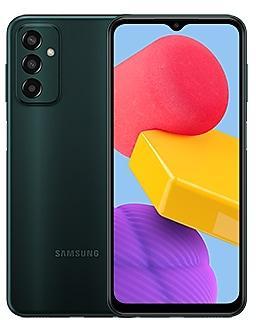
Samsung Galaxy M13 M135MUBS7EXH1 Firmware
Samsung Galaxy M13 M135MUBS7EXH1 is an Android 14 firmware for 10 countries, 10 CSC codes. It is the same firmware configured per region and carrier (CSC). Find your country below, verify the file and download for free. Compared with the previous build M135MUBU6EXF2 https://samfirm.shop/build/M135MUBU6EXF2: bootloader binary raised from 6 to 7, so after installing it there is no way back to older builds; security patch 2024-09-01 instead of 2024-06-01. A newer build for SM-M135M is available: M135MUBSEEZE2 https://samfirm.shop/build/M135MUBSEEZE2.
Bootloader binary 7. Flashing firmware with a lower binary is usually blocked by Samsung anti-rollback.
All regional downloads
Pick your region (CSC) to download the matching firmware package.
How to flash M135MUBS7EXH1
- Install Samsung USB Drivers:Download Official Drivers
- Download Odin Flash Tool:
- M135MUBS7EXH1 has bootloader binary 7. Your device must run binary 7 or lower: it is the 5th character from the end of your current build number.
- CSC: Use CSC for a clean install, to change the region (CSC code), to downgrade or to repair a device that does not boot.
- HOME_CSC: Use HOME_CSC to update the same model and region while keeping your data. Back up anyway: a failed update can still require a reset.
- The Download Mode key combo depends on the model: see all combos.
What's new in M135MUBS7EXH1
• The security of your device has been improved.
Security patch: September 2024
SMR Sep-2024 fixes 62 vulnerabilities, 1 of them critical. Android Security Bulletin: 44, Samsung-specific issues (SVE): 18.
Most severe Samsung fixes:
- high Improper handling of exceptional conditions in ThemeCenter (CVE-2024-34638)
- high Improper input validation in ThemeCenter application (CVE-2024-34645)
- high Improper access control in DualDarManagerProxy (CVE-2024-34646)
Rollout of M135MUBS7EXH1 by region
- First release
- September 23, 2024
- Last region
- September 27, 2024
- Duration
- 5 days
- Regions
- 10
- Day 1 · · 8 regionsArgentinaAROBoliviaBVOChileCHOGuatemalaGTOPanamaTPAPeruPEOUruguayUPOMXD
- Day 5 · · 2 regionsBrazilZTOColombiaCOO
Device specifications
- Display diagonal16.8 cm (6.6")
- Display resolution1080 x 2408 pixels
- RAM4 GB
- Rear camera resolution50 MP
- Rear camera typeTriple camera
- Battery capacity5000 mAh
- Weight192 g
Specifications of SM-M135F, a regional variant of the same device. Chipset and SIM lines are left out: they can differ by region.
Frequently Asked Questions
Other builds and changelog for Samsung Galaxy M13
• Security
The device is protected with improved security.
These changes may vary depending on the model, country, or network operator of the customer environment.
- M135MUBSEEZE2May 25, 2026
- M135MUBSDEZB1Mar 10, 2026
- M135MUBSCEYK1Dec 2, 2025
- M135MUBSBEYH1Aug 28, 2025
The device is protected with improved security.
These changes may vary depending on the model, country, or network operator of the customer environment.
• The security of your device has been improved.
- M135MUBS9EYB1Feb 25, 2025
- M135MUBS9EXJ3Nov 28, 2024
- M135MUBS8EXJ1Oct 28, 2024
- M135MUBS7EXH1Sep 23, 2024
New wallpaper editing features
Decorate your wallpaper however you like. When you select an image to use as your wallpaper, you can now apply frames and effects.
More widgets for your Lock screen
Additional widgets are available for your Lock screen so you can quickly check useful information without unlocking your phone. The new widgets include Weather, Samsung Health, Battery, Reminder, Calendar, and Clock.
Customize alarm alerts
Use an image, vid...
• The security of your device has been improved.
- M135MUBS6DXE3May 24, 2024
- M135MUBS6DXE2May 24, 2024
- M135MUBS5DXC6Apr 10, 2024
- M135MUBS5DXC5Apr 9, 2024
Show 6 older builds
New button layout
The quick panel has a new layout that makes it easier to access the features you use most. Wi-Fi and Bluetooth now have their own dedicated buttons at the top of the screen, while visual features, like Dark mode and Eye comfort shield have been moved to the bottom. Other quick settings buttons appear in a customizable area in the middle.
Instantly access the full quick panel
By default, a compact quick panel with notifications ap...
• The security of your device has been improved.
New button layout
The quick panel has a new layout that makes it easier to access the features you use most. Wi-Fi and Bluetooth now have their own dedicated buttons at the top of the screen, while visual features, like Dark mode and Eye comfort shield have been moved to the bottom. Other quick settings buttons appear in a customizable area in the middle.
Instantly access the full quick panel
By default, a compact quick panel with notifications ap...
One UI 5.1 takes your phone to the next level with new Gallery features as well as productivity and personalization enhancements.
Quickly change the color tone for selfies
It's easier to change the color tone of your selfies using the Effects button at the top of the screen.
Discover Expert RAW
Expert RAW lets you take high-quality shots without processing or compression, perfect for those who want to have full control and edit photos later. Expert RAW...
• The security of your device has been improved.
One UI 5.1 takes your phone to the next level with new Gallery features as well as productivity and personalization enhancements.
Quickly change the color tone for selfies
It's easier to change the color tone of your selfies using the Effects button at the top of the screen.
Discover Expert RAW
Expert RAW lets you take high-quality shots without processing or compression, perfect for those who want to have full control and edit photos later. Expert RAW...