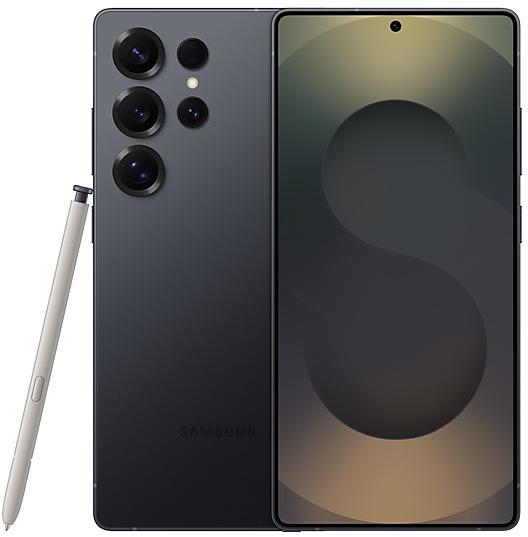
Samsung Galaxy S25 Ultra S938BXXU9CZDP Firmware
Samsung Galaxy S25 Ultra S938BXXU9CZDP is an Android 16 firmware for 57 countries, 102 CSC codes. It is the same firmware configured per region and carrier (CSC). Find your country below, verify the file and download for free. Compared with the previous build S938BXXS9BZCK, Android and the bootloader binary are unchanged, so you can switch between the two in both directions. A newer build for SM-S938B is available: S938BXXSDDZJ1.
Bootloader binary 9. Flashing firmware with a lower binary is usually blocked by Samsung anti-rollback.
All regional downloads
Pick your region (CSC) to download the matching firmware package.
No matching downloads
Device specifications
- Launched withAndroid 15
- Display diagonal17.5 cm (6.9")
- Display resolution3120 x 1440 pixels
- Processor frequency3.5 GHz
- Processor familySnapdragon
- Processor model8 Elite
- RAM12 GB
- Rear camera resolution200 MP
- Rear camera typeQuad camera
- SIM cardsDual SIM
- Battery capacity5000 mAh
- Weight218 g
What's new in S938BXXU9CZDP
Fresh new look
One UI seamlessly integrates into your daily routine by combining immersive visuals with meaningful personalization for a more refined and sophisticated design. Transparent blur effects add depth and make content easier to navigate, while floating elements react organically to your workflow for a more focused experience. Through familiar and intuitive data visualization, One UI delivers a design that feels both personal and relatable, helping you focus on what matters.
Screen calls before answering
See who's calling so you can decide if you want to talk. You can let a call assistant answer for you and ask the caller who they are why they're calling.
Edit images with text prompts
Image editing has never been easier. Just describe how you want your image to change. You can change the color of someone’s clothes, add something to an empty table, or anything else you can think of.
Add items from one image to another
Photo assist makes it easy to combine elements from different images. Take an object from one picture and add it to a different picture. Galaxy AI smooths it out and makes it look natural.
Add style to any photo
You can now apply fun styles to any photo with Photo assist, not just pictures of people or pets. In thumbnail view, you can touch and hold to reorder your styles and put your favorites near the front.
Continuous image generation
Keep creating without stopping. Photo Assist now lets you generate AI images using different features from the results screen without saving each iteration. When you’re done, you can review all your creations in your history and pick your favorites.
Create images with Creative Studio
Creative Studio is now available on the Apps screen for easier access. You can use creative studio to create custom wallpapers, unique stickers, and personalized profile images that you can use throughout on your phone.
Now brief on the Lock screen
Get more personalized suggestions on your Lock screen. Now brief will show useful information based on your context.
Enhanced AI select
Start AI select instantly by touching and holding the edge handle. Missed something in a video? Use the Rewind button to go back and select exactly what you need.
Auto language detection in Interpreter
Keep the conversation flowing. After you choose which languages to translate, Interpreter will detect when each one is being spoken so you don’t need to press the Microphone button each time someone talks.
Smarter device control
Talk to Bixby in your own words. Bixby is now better at finding the setting or feature you need, even if you don’t use exact commands or feature names. Just say what you need and let Bixby do the rest.
Ask anything, anytime
Whether you need a quick answer or detailed information, just ask Bixby for an instant response. There's no need to spend time on multiple searches or switching between apps.
Conversation history
Looking back at past conversations with Bixby is easier than ever. You can now access your conversation history from the side panel in the Bixby app.
Pro-grade document scans
Scanning documents is now faster and more powerful. A scan button will appear automatically whenever you point your camera at a document. You can easily capture multiple pages into a single PDF file, while the new Remove tool automatically cleans up distracting fingers, folded corners, and unwanted moire for a perfect finish.
Auto motion photos
When set to Auto, your camera will only record a motion photo if it detects movement in the scene. Otherwise, it's saved as a still image to save space.
Capture both sides of the story
Now you can record yourself and the action in front of you. Just tap the dual recording icon in the Video mode quick controls to start filming with the front and rear cameras at the same time.
Log video color previews in real time
Take the guesswork out of filming in Log. You can now apply a cinematic LUT preview while you record, letting you see exactly how your final color-corrected video will look before you even start editing. LUT previews are also available in Gallery and Studio.
New portrait filters
Three new filters are available to add vibrant film-like effects to your pictures.
Automatic Lock screen layout
Wallpapers with pictures of people or pets now fit perfectly every time. When you choose a photo for your Lock screen, the photo will automatically be adjusted to best fit your clock and widget layout.
New downloadable wallpapers
Discover new wallpapers featuring interactive elements. Wallpapers are downloadable so they don’t use up your storage space when not in use.
Add weather effects to wallpapers
Bring your wallpaper to life with the current weather conditions. When you choose your wallpaper, you can add weather effects directly from the preview screen.
More customizable clock fonts
Personalize your Lock screen clock. You can now adjust the thickness of more font styles to match your preferred look.
Enhanced weather widget
Quickly check upcoming precipitation in the Weather widget on your Home screen. The widget now shows a graph if precipitation is expected in the next few hours.
Pollen index
Check how much pollen is in the air to help manage your allergies. You can check pollen levels for trees, grass, and ragweed.
Direct voicemail
Can't answer right now? Let callers record a voice message directly on your phone that you can listen to later. The message will appear on your screen as it’s being recorded so you can answer at any time.
Decline calls with personalized messages
When a call is ringing, new quick decline messages will appear based on your activity. You can tell callers that you can’t answer because you’re driving or exercising even without typing.
Weather alarm backgrounds
Wake up to an alarm that gets you ready for the day’s weather. Your alarm screen can now show the current weather conditions as a background when it rings.
Time zone converter
Compare time zones at a glance. The new slider in the Clock app makes it easy to check the time difference between places around the world.
Storage Share
Access your files anywhere. Files from your other Samsung phones, tablets, and PCs are available in the My Files app on your phone. You can also access your phone's files on other Samsung devices, even your TV.
Quickly connect to Smart View devices
Connect to your favorite display faster. You can now add a shortcut on your Home screen to instantly mirror your phone’s screen to a TV or other display device.
Enhanced Auracast features
It’s easier than ever to listen to and broadcast sound with Auracast. Options for both broadcasting and listening are now located in the Audio broadcast menu in Settings.
Voice broadcasts
Broadcast your voice to people around you with Auracast. In addition to media sound, you can now broadcast your voice using your phone’s built-in microphone.
Share with Apple devices
Share with even more devices than before. You can now use Quick Share to seamlessly share photos, videos, and other files with iPhones, iPads, Macs, and other devices that support AirDrop.
Avoid unwanted sharing requests
You can now set Quick Share to only receive files from other devices signed in to your Samsung account or Google account.
Photo sharing suggestions
Share photos with the right people faster. When you share pictures that include friends or family, Quick Share can recognize who’s in them and suggest sharing directly with those people.
Enhanced weekly reports
See a fuller picture of your health each week. Weekly reports now include data from your medication tracker and mindfulness sessions.
Upgraded sharing experience
Share your workouts your way. Mix and match your exercise stats with photos from your workout to create the perfect social media post.
Start meditations from your watch
Find calm right from your wrist. You can now start favorite or recommended meditations directly on your Galaxy Watch without picking up your phone.
Antioxidant measurements from your watch
Check your antioxidant levels anytime. Measure directly from your Galaxy Watch, even if it’s not connected to your phone. Works with Galaxy Watch8 and Galaxy Watch Ultra.
Revamped battery info
See your battery use more clearly. The redesigned Battery settings screen makes it easier to check remaining time, charging status, and daily usage over the past week.
Improved Power saving
Use Power saving to make your battery last longer without charging. Choose Standard for moderate savings and customizable limits, or choose Maximum to turn off all non-essential features and make your battery last as long as possible.
Privacy alerts
Stay informed about your privacy. You’ll now get alerts when an app’s permissions could put your personal data at risk along with suggestions for what you can do about it.
Theft protection
Keep your phone and data safe in case it is lost or stolen. Turn on Failed authentication lock to automatically lock the screen in case there are too many failed attempts to verify your identity using your fingerprints, PIN, pattern, or password. Identity check also protects even more settings than before.
Turn off Auto blocker temporarily
If you need to temporarily disable Auto blocker's security protection, a new option lets you turn it on automatically 30 minutes later so you don't forget.
Check the security status of your devices
Keep all your devices protected. Knox Matrix now shows when any of the supported devices signed in to your Samsung account need a software update for the latest security protections.
Easily control Bluetooth hearing aids
Access settings for your Bluetooth hearing aids directly from the Accessibility shortcut. A pop-up will appear that lets you change your hearing program, turn Ambient sound on or off, and more.
Control magnification with mouse or keyboard
Keep what you need magnified in view with these new options. You can make the magnified area follow the cursor as you type or move when you change focus using the keyboard. When using a mouse, you can make the magnified area shift as you move the pointer to the edge of the screen.
Dwell action and Corner actions
The Auto action after pointer stops feature has been divided into 2 features. Dwell action lets you set custom actions when your mouse stops moving for a certain amount of time. Corner actions let you set a different action for each corner of the screen.
Dim strobing in videos
A new setting lets you dim strobing effects in videos for more comfortable viewing.
More customizable quick panel
Arrange your quick settings just the way you like them. You can now add, remove, reorder, and reorganize controls in the quick panel.
Customize Calendar countdown widgets
Make your countdown widgets look just the way you like. Use Creative studio to generate a background image, choose an image from Gallery, or go with a solid color.
Early alerts for reminders
Get alerts before reminders are due to make sure you don’t forget important tasks. You can choose how far in advance to get an alert for each reminder.
Insert tables in Samsung Notes
Organize information in your notes with tables. You can adjust column widths, colors, and border designs while the auto calculation feature helps you stay productive and save time.
Redesigned New tab page
The page that appears when you open a new tab in Samsung Browser has been redesigned to help you quickly access the websites and features you need the most. The New tab page now shows the current security status as well as open tabs from Samsung Browser on other devices.
Partial screen recording
Include only what you need in your screen recordings. You can now select only the part of the screen that you want to record.
Calculator nudges
Save time on calculations. Numbers and formulas copied to your clipboard will be suggested when you open Calculator so you can enter them with a quick tap.
Keep window sizes in DeX
DeX now remembers your app window sizes and positions. When you open an app again, it appears just as you left it.
How to flash S938BXXU9CZDP
- Install Samsung USB Drivers:Download Official Drivers
- Download Odin Flash Tool:
- S938BXXU9CZDP has bootloader binary 9. Your device must run binary 9 or lower: it is the 5th character from the end of your current build number.
- CSC: Use CSC for a clean install, to change the region (CSC code), to downgrade or to repair a device that does not boot.
- HOME_CSC: Use HOME_CSC to update the same model and region while keeping your data. Back up anyway: a failed update can still require a reset.
- The Download Mode key combo depends on the model: see all combos.
Frequently Asked Questions
Other builds and changelog for Samsung Galaxy S25 Ultra
• Security
The device is protected with improved security.
These changes may vary depending on the model, country, or network operator of the customer environment.
Enhanced Now nudge
Now nudge provides helpful suggestions in more places throughout your Galaxy experience. In addition to the keyboard, suggestions will now appear in conversation notifications and in a floating button in the bottom right corner of the screen. There are also several new types of suggestions, like entering reservation details or addresses and saving places in Google Maps.
Focus on someone important
My FanCam lets you select a person in a video and follow...
• Security
The device is protected with improved security.
These changes may vary depending on the model, country, or network operator of the customer environment.
• Security
The device is protected with improved security.
These changes may vary depending on the model, country, or network operator of the customer environment.
• Security
The device is protected with improved security.
These changes may vary depending on the model, country, or network operator of the customer environment.
Show 15 older builds
• Stability and reliability
Device behavior has been improved.
• Security
The device is protected with improved security.
These changes may vary depending on the model, country, or network operator of the customer environment.
Fresh new look
One UI seamlessly integrates into your daily routine by combining immersive visuals with meaningful personalization for a more refined and sophisticated design. Transparent blur effects add depth and make content easier to navigate, while floating elements react organically to your workflow for a more focused experience. Through familiar and intuitive data visualization, One UI delivers a design that feels both personal and relatable, helping you focus...
Fresh new look
One UI seamlessly integrates into your daily routine by combining immersive visuals with meaningful personalization for a more refined and sophisticated design. Transparent blur effects add depth and make content easier to navigate, while floating elements react organically to your workflow for a more focused experience. Through familiar and intuitive data visualization, One UI delivers a design that feels both personal and relatable, helping you focus...
• Security
The device is protected with improved security.
These changes may vary depending on the model, country, or network operator of the customer environment.
• Security
The device is protected with improved security.
These changes may vary depending on the model, country, or network operator of the customer environment.
• Security
The device is protected with improved security.
These changes may vary depending on the model, country, or network operator of the customer environment.
• Security
The device is protected with improved security.
These changes may vary depending on the model, country, or network operator of the customer environment.
• Security
The device is protected with improved security.
These changes may vary depending on the model, country, or network operator of the customer environment.
· Device stability improvements, bug fixes.
· New and / or enhanced features.
· Further improvements to performance.
• Security
The device is protected with improved security.
These changes may vary depending on the model, country, or network operator of the customer environment.
• Security
The device is protected with improved security.
These changes may vary depending on the model, country, or network operator of the customer environment.
See calls on the screen
Call captions show what each person says on the screen in real time during calls. Follow the conversation on your screen to make sure you don’t miss anything.
Create unique pet portraits
Bring out your pet's personality with Portrait studio. You can now apply portrait effects to pictures of dogs and cats in addition to people. Choose from styles like Fisheye lens, oil painting, and more.
Clean up sound
Use Audio eraser to automatica...