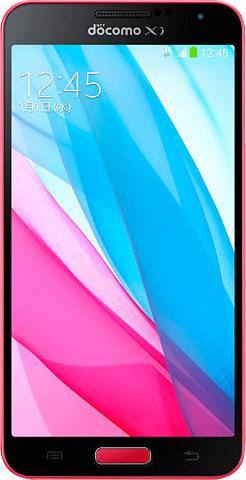
SC-02F https://samfirm.shop/model/SC-02F 1 country
Samsung GALAXY J SC02FOMUCNC3 Firmware
Samsung GALAXY J SC02FOMUCNC3 is an Android firmware for Japan (DCM). It is the same firmware configured per region and carrier (CSC). Find your country below, verify the file and download for free. Compared with the previous build SC02FOMUBMJ9 https://samfirm.shop/build/SC02FOMUBMJ9, Android and the bootloader binary are unchanged, so you can switch between the two in both directions. A newer build for SC-02F is available: SC02FOMUGPG1 https://samfirm.shop/build/SC02FOMUGPG1.
9.1/10 (471)4,272 times
n/a
OS Version
2014-03-15
Build Date
n/a
Security patch
1
Countries
1
CSC codes
U (30)
Bootloader binary
Bootloader binary U (30). Flashing firmware with a lower binary is usually blocked by Samsung anti-rollback.
All regional downloads
Pick your region (CSC) to download the matching firmware package.
Paste your current build number from Settings > About phone (About tablet) > Software information, or the output of *#1234#.
MODEM/CP Version: SC02FOMUCNC3
How to flash SC02FOMUCNC3
- Install Samsung USB Drivers:Download Official Drivers
- Download Odin Flash Tool:
- SC02FOMUCNC3 has bootloader binary U (30). Your device must run binary U (30) or lower: it is the 5th character from the end of your current build number.
- CSC: Use CSC for a clean install, to change the region (CSC code), to downgrade or to repair a device that does not boot.
- HOME_CSC: Use HOME_CSC to update the same model and region while keeping your data. Back up anyway: a failed update can still require a reset.
- The Download Mode key combo depends on the model: see all combos.
Beware: Manually flashing firmwares may brick your device. Use it at your own risk and follow our tutorial steps.
Frequently Asked Questions
No. A newer build for SC-02F is available: SC02FOMUGPG1. Install it instead of SC02FOMUCNC3 unless you need this exact version. The previous build was SC02FOMUBMJ9.
Download the package for your region (CSC) and unzip it. In Odin, load each file into the slot with the same name: BL, AP, CP (if the package has one) and CSC, or HOME_CSC to keep your data. Odin checks the built-in checksum of every .tar.md5 file before flashing. The download is 1.469 GiB; keep about twice that free on the computer to unzip it. The Samsung GALAXY J must be on bootloader binary U (30) or lower.
This build uses bootloader binary U (30). It can be flashed on a Samsung GALAXY J running binary U (30) or lower; if the device already has a higher binary, Odin stops with "SW REV CHECK FAIL". 6 other builds of this model use the same binary, so you can switch between them in both directions.
Other builds and changelog for Samsung GALAXY J
No changelog details available.
No changelog details available.
No changelog details available.
No changelog details available.
No changelog details available.
Show 3 older builds
No changelog details available.
No changelog details available.
No changelog details available.