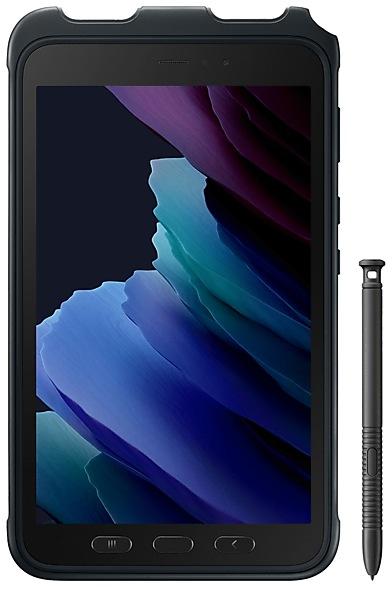
Samsung Galaxy-Tab Active3 T570XXU3BUD6 Firmware
Samsung Galaxy-Tab Active3 T570XXU3BUD6 is an Android 11 firmware for 5 countries, 5 CSC codes. It is the same firmware configured per region and carrier (CSC). Find your country below, verify the file and download for free. Compared with the previous build T570XXS3AUC2: Android updated from Android 10 to Android 11. A newer build for SM-T570 is available: T570XXSFEYI1.
Bootloader binary 3. Flashing firmware with a lower binary is usually blocked by Samsung anti-rollback.
All regional downloads
Pick your region (CSC) to download the matching firmware package.
No matching downloads
Device specifications
- Display diagonal20.3 cm (8")
- Display resolution1920 x 1200 pixels
- Processor familySamsung Exynos
- Processor model9810
- Rear camera resolution13 MP
- Rear camera typeSingle camera
- Front camera resolution5 MP
- Wi-Fi standardWi-Fi 6 (802.11ax)
- Weight426 g
What's new in T570XXU3BUD6
One UI 3.1 Upgrade (Android 11)
One UI 3.1 is designed to help you focus on what matters. Our visual redesign has improved the places you visit the most, like the Home screen and quick panel, to reduce distractions, highlight important information, and make your experience more consistent. Performance improvements will help apps run quicker while using less battery power. And One UI 3.1 puts control in your hands with new privacy controls, one-time permissions, and enhanced Digital Wellbeing.
Scroll down for a full list of changes.
Visual design
We’ve refreshed the look and feel of One UI 3.1 in lots of ways, big and small, from new, more consistent icons to smarter organization of the quick panel and notifications. Motion is smoother and more natural than ever, with improved animations and haptic feedback for common interactions. And the interface responds to different screen sizes to provide the best experience on any device, whether it’s a phone, foldable, or tablet.
Improved performance
We optimized One UI 3.1 with enhanced dynamic memory allocation, so apps run faster and perform better. We’ve also restricted background activities to provide better performance and power usage.
Better customization
• New image categories have been added to Dynamic Lock screen, and you can select up to 5 categories at once.
• On the Lock screen, you can add a widget to check your usage time.
• Get an interactive preview when setting a wallpaper.
• Adjusting the Lock screen is easier.
• Add a call background to see a picture or video when you make or receive a call.
• In Samsung Internet, you can reorder and lock tabs.
• Bixby Routines has even more controls to help you automate your life.
• New icons and Lock screen widgets make it easier to find and control your routines.
• Use Digital Wellbeing with separate personal and work profiles.
Enhanced features
Home screen and Lock screen
• Add widgets by touching and holding an app on the Home screen.
• Turn off the screen by double tapping on an empty space on the Home or Lock screen. (Set it up in Settings > Advanced features > Motions and gestures.)
• On the Lock screen, tap the clock area to see widgets like calendar, weather, and music.
Calls and chats
• See conversations separately in the notification panel. Works with Messages and your favorite chat apps.
• Easily remove duplicate contacts stored in the same account in Contacts. The storage period for deleted contacts has been extended from 15 days to 30 days.
• Added the ability to edit multiple linked contacts from a single screen.
• Added Trash in Messages so that recently deleted messages are stored for 30 days.
Pictures and videos
• Take pictures quicker with improved auto focus and auto exposure.
• View, edit, and share pictures and videos more easily from Gallery.
• Find pictures and videos quicker with new search features and categories in Gallery.
• Revert edited pictures to their original versions at any time, even after they’re saved, so you never lose a shot.
Settings
• Settings has a new simpler look and feel. Your Samsung account is shown at the top, and Home screen settings are now easier to access.
• Find the settings you need more easily with new Search features. You’ll get better results for synonyms and common misspellings, and you can tap on tags to see groups of related settings.
• Quick settings buttons have been reduced to provide only the most commonly used features. You can also add buttons to create your own customized quick panel.
Samsung Keyboard
• Increased the number of input languages to 370.
• Made it easier to paste copied images and verification codes from text messages.
• Added emoji and sticker suggestions when you enter a text-based emoticon.
• Reorganized Keyboard settings so it's easier to access frequently used settings.
Productivity
Maintain a healthy balance between work and life by minimizing repetitive and complicated tasks and handling them efficiently.
• New routines will be recommended based on your daily life and usage patterns.
• Bixby Routines provide a setting to return everything to the way it was before the routine ran.
• In Internet, you can hide the status and navigation bars for a more immersive experience and quickly translate webpages.
• You’ll be prompted to block websites that send too many pop-ups or notifications.
• You can browse and select cloud drive files from the file selection screen in My Files.
• You can now delete cache files in My Files to easily free up storage space.
• Events with the same start time are displayed together in the month and list views in Calendar.
• Use your phone or tablet app icon layout in Samsung DeX so you know where everything is.
Easy media and device control
Media and device control is easier with the improved media panel in notifications. You can see recently used media apps and quickly change the playback device. You can also check Android Auto settings in the Advanced features menu in Settings.
Identify and improve your digital habits
Improved Digital Wellbeing features make it easy to check how you're using your phone or tablet and help you form good digital habits. Check your usage while driving or see weekly changes in your screen time by function at a glance through upgraded weekly reports.
Accessibility for everyone
One UI 3.1 recommends useful accessibility features for you based on your usage. The improved Accessibility shortcut makes accessibility features easier to start and use. You can use the Speak keyboard input aloud feature to get voice feedback of your typing even when TalkBack is turned off.
Stronger privacy protection
You can now let an app access to your microphone, camera, or location just one time. Any permissions that an app hasn’t used in a while will be automatically revoked. You can no longer give apps permission to always see your location in the regular permission popup. To let apps access your location when they’re not in use, you need to go to the location permission page for the app in Settings.
Calendar
• Extract the date and address from the event title and recommend automatic registration.
• Receive notifications from SmartThings devices that also have specified schedule notifications.
Camera
• The performance of Camera has been improved
Buds Auto Switching
• Support Buds auto switching between Galaxy phone and tablet.
Reminder
• Extract the date and address from the reminder memo and recommend to register automatically, and remind important information by situation.
Share Sheet
• It is now possible to protect your privacy by deleting the location information of previously taken photos before sharing or posting them on social media.
Social Platform
• Synchronize valid links created on devices with the same registered Samsung account.
• The use of social media services has been simplified. It is possible to share profiles, photos, notes, schedules, and more with friends simply by logging in to your Samsung account.
Additional improvements
• In Clock, you can hear the time and preset name of the alarm read aloud when an alarm rings.
Some apps will need to be updated separately after the One UI 3.1 update.
You can no longer use Wi-Fi Direct to send files to other devices. You can use Nearby Share instead. You can still receive files using Wi-Fi Direct.
You can no longer connect to Chromecast using Smart View. You can use Google Home instead.
How to flash T570XXU3BUD6
- Install Samsung USB Drivers:Download Official Drivers
- Download Odin Flash Tool:
- T570XXU3BUD6 has bootloader binary 3. Your device must run binary 3 or lower: it is the 5th character from the end of your current build number.
- CSC: Use CSC for a clean install, to change the region (CSC code), to downgrade or to repair a device that does not boot.
- HOME_CSC: Use HOME_CSC to update the same model and region while keeping your data. Back up anyway: a failed update can still require a reset.
- The Download Mode key combo depends on the model: see all combos.
Frequently Asked Questions
Other builds and changelog for Samsung Galaxy-Tab Active3
• Security
The device is protected with improved security.
These changes may vary depending on the model, country, or network operator of the customer environment.
• Security
The device is protected with improved security.
These changes may vary depending on the model, country, or network operator of the customer environment.
Show 15 older builds
· Device stability improvements, bug fixes.
· New and / or enhanced features.
· Further improvements to performance.
Better app previews on the Recents screen
The Recents screen now shows apps as they will appear after you open them. You can easily see if an app is opened in split screen, full screen, or as a pop-up.
Easily switch from pop-up view to split screen
Press and hold the handle at the top of the pop-up window, then drag the app to the side of the screen where you want it to be shown.
Restore pop-ups snapped to the edge of the screen
Drag an app in pop-up view t...
· Device stability improvements, bug fixes.
· New and / or enhanced features.
· Further improvements to performance.
· Device stability improvements, bug fixes.
· New and / or enhanced features.
· Further improvements to performance.
One UI 5 brings you more powerful personalization and makes it easier to get things done across your Galaxy devices.
New app icons and illustrations
Icon symbols are larger for a bolder look that's easier to scan. Subtle background gradients and improved contrast give a fresher, more natural feel. New help illustrations have been created to give a consistent look to all apps.
Smoother than ever before
New animations and transition effects make swi...
· Device stability improvements, bug fixes.
· New and / or enhanced features.
· Further improvements to performance.
· Device stability improvements, bug fixes.
· New and / or enhanced features.
· Further improvements to performance.
One UI 5.1 Update
One UI 5.1 takes your tablet to the next level with new Gallery features as well as productivity and personalization enhancements.
More powerful search
You can now search your Gallery for more than one person or subject at the same time. You can even search for people without tagging their names just by tapping their faces.
Revamped info display
When you swipe up while viewing a picture or video in your Gallery, you can see when and where the picture was taken, whic...