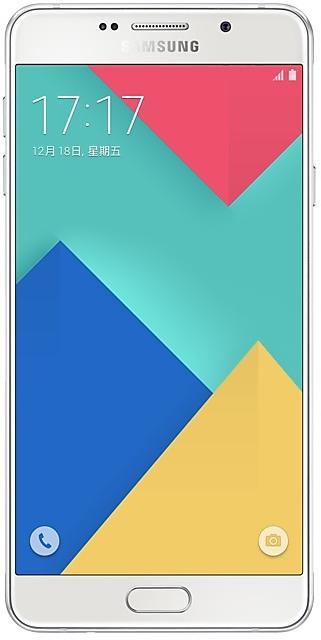
Download Samsung Firmware SM-A7100
Samsung Galaxy A7(2016)
The latest firmware for Samsung Galaxy A7(2016) (SM-A7100) is A7100ZHS1CTI1 with Android 5.1.1 (Lollipop), released on November 16, 2020 for 1 region (CSC). Every official firmware build for SM-A7100, newest first: one row per build with all regions (CSC) that received it.
- Builds
- 22 builds
- Regions (CSC)
- 2 regions
Firmware builds for SM-A7100
- TGY
- CHC
- CHC
- TGY
- TGY
- CHC
- CHC
- TGY
- TGY
- CHC
- TGY
- CHC
- TGY
- CHC
- CHC
- CHC
- TGY
- CHC
- TGY
- CHC
- CHC
- TGY
Each firmware build has its own page at https://samfirm.shop/build/{PDA}, where {PDA} is the build number from the list above. Example: https://samfirm.shop/build/A7100ZHS1CTI1
SM-A7100 update history
All 22 builds in our database run Android 5.1.1 (Lollipop). The newest build, A7100ZHS1CTI1, was released on November 16, 2020 with the November 2018 security patch. No new build has appeared for 72 months, so regular updates for this model have most likely ended.
Device specifications
- Launched with
- Android 5.1
- Display diagonal
- 14 cm (5.5")
- Display resolution
- 1920 x 1080 pixels
- Display type
- SAMOLED
- RAM
- 3 GB
- Rear camera resolution
- 13 MP
- Rear camera type
- Single camera
- Battery capacity
- 3300 mAh
- Weight
- 172 g
Specifications of SM-A710F, a regional variant of the same device. Chipset and SIM lines are left out: they can differ by region.
Changelog for SM-A7100
- The latest Android security patch has been applied.
ㆍDevice security has been further enhanced.
- A7100ZCS1CTI1Nov 16, 2020
- A7100ZHS1CTI1Nov 16, 2020
- OS upgrade - Android 7.1 Nougat
- Provides new UX
- Improved usability of the Notification feature and Quick settings button
- Multi window is supported
- Improved setting menu
- Efficient space for installation of downloaded apps, improved speed of system upgrade and app installation
- Added new feature
· Samsung Cloud V3 is supported in this update,upto 15GB cloud space can be used to backup or sync user data,photos,videos and applications.
· After upgrading, OneDrive App will be removed. Yo...
- OS upgrade - Android 7.1 Nougat
- Provides new UX
- Improved usability of the Notification feature and Quick settings button
- Multi window is supported
- Improved setting menu
- Efficient space for installation of downloaded apps, improved speed of system upgrade and app installation
- Added new feature
· Samsung Cloud V3 is supported in this update,upto 15GB cloud space can be used to backup or sync user data,photos,videos and applications.
· After upgrade to N OS, Samsung Cloud delete the a...
- Improved performance
ㆍWeather widget stability improved.
- The latest Android security patch has been applied.
ㆍDevice security has been further enhanced.
- Changed from "China Telecom(Macau)" to "China Telecom"
- Other bug fixes
ㆍFixed an issue that contacts name don't display in calling screen.
ㆍFixed an issue that the location of weather widget does not update.
- Improved performance
ㆍOptimize battery long life.
- The latest Android security patch has been applied.
ㆍDevice security has been further enhanced.
Show 19 older builds
- The latest Android security patch has been applied.
ㆍDevice security has been further enhanced.
- A7100ZHU1BQF1Jul 4, 2017
- A7100ZCU1BQF1Jun 30, 2017
- Other bug fixes
ㆍWhen checking the mail with the Knox Container app, the problem that the mail body disappears is solved.
- The latest Android security patch has been applied.
ㆍDevice security has been further enhanced.
- The latest Android security patch has been applied.
ㆍDevice security has been further enhanced.
ㆍOS upgrade - Android 6.0 Marshmallow
※ Security Enhancements
※ Some apps may be incompatible after OS upgraded.
please update the apps to the latest version via Galaxy Apps and Play store.
※ After uploda to Android OS 6.0, following app will be installed:Smart Tutor and Facebook
※ After upgrade, Google Settings is not supported again, which will be removed.
· OS upgrade - Android 6.0 Marshmallow
· The new TouchWiz provides enhanced usability and an updated visual design.
· Quick connect helps you easily find and connect to nearby devices by showing currently connected devices and previous connections.
· Fingerprints are securely protected. An alternative unlock method (pattern, PIN, or password) is required to add fingerprints.
· A new vibration pattern concept has been applied.
※ Before OS 6.0 upgrading, please be sure to update the Samsung Gear t...
- The latest Android security patch has been applied.
ㆍDevice security has been further enhanced.
- A7100ZHU1APL1Dec 28, 2016
- A7100ZCU1APK4Dec 3, 2016
- Improved performance
ㆍThe Stability of Samsung Pay Function has been improved
- The latest Android security patch has been applied.
ㆍDevice security has been further enhanced.
- The latest Android security patch has been applied.
ㆍDevice security has been further enhanced.
- Improved performance
ㆍThe device performance has enhanced with efficient system management.
- The latest Android security patch has been applied.
ㆍDevice security has been further enhanced.
ㆍAdded the icon about the SamsungPay
ㆍImproved performance with efficient memory management
ㆍApply the new vibration mode
ㆍApply the Andriod regular security patch.
- Improved performance with efficient memory management
- Fixed not fully charging battery problem at low temperature
- Fixed not fast charging problem during power off
- Apply the Andriod regular security patch.
ㆍImproved performance with efficient memory management
ㆍFixed not fully charging battery problem at low temperature
ㆍFixed not fast charging problem during power off
ㆍApply the Andriod regular security patch.
ㆍThe security of your device has been improved.
ㆍAdded the "Galaxy Care" that provied the optimization, searching the new infomation, question and answer etc. for customer
ㆍAdd QR Code feature for Camera.
ㆍApply the Andriod regular security patch.
ㆍThe stability of Music app has been improved.
ㆍThe security of your device has been improved.
ㆍUpdate PaperFun Theme
ㆍUpdate SmartManager Application
ㆍUpdate Message Application
ㆍIncreased the stability of system
ㆍIncreased the stability of camera
Similar Models
- https://samfirm.shop/model/SM-A710X

Samsung Galaxy A7(2016)
SM-A710X
- https://samfirm.shop/model/SM-A715X

Samsung Galaxy A71
SM-A715X
- https://samfirm.shop/model/SM-A716V

Samsung Galaxy A71 5G
SM-A716V
- https://samfirm.shop/model/SM-A700X

Samsung Galaxy A7
SM-A700X
- https://samfirm.shop/model/SM-A725M
Samsung Galaxy A72
SM-A725M


Frequently Asked Questions
What is the latest Android version for SM-A7100?
The newest firmware for SM-A7100 runs Android 5.1.1 (Lollipop): build A7100ZHS1CTI1, released on November 16, 2020.
When did SM-A7100 get its last update?
The latest build for SM-A7100, A7100ZHS1CTI1, was released on November 16, 2020 (5 years ago).
How often does SM-A7100 get updates?
SM-A7100 has had no new firmware for 72 months, so regular updates have most likely ended.
Is the firmware for SM-A7100 official?
Yes, all firmware files for SM-A7100 are 100% official, original, and obtained directly from Samsung servers.
How to flash Samsung SM-A7100 using Odin?
To flash SM-A7100, you need to download the appropriate firmware, put your device into Download Mode, and use the Odin tool to load the BL, AP, CP, and CSC files.
Can I downgrade the Android version on SM-A7100?
Downgrading is only possible if the bootloader version (binary bit) of the old firmware matches the current one. Always check the binary version before flashing SM-A7100.