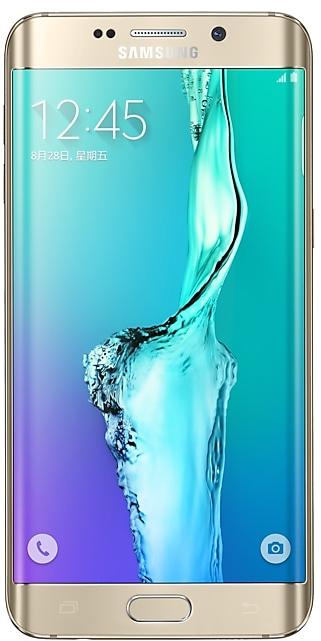
Download Samsung Firmware SM-G9280
Samsung Galaxy S6 Edge+
Every official firmware build for SM-G9280, newest first: one row per build with all regions (CSC) that received it.
- Builds
- 32 builds
- Regions (CSC)
- 1 region
Firmware builds for SM-G9280
- CHC
- CHC
- CHC
- CHC
- CHC
- CHC
- CHC
- CHC
- CHC
- CHC
- CHC
- CHC
- CHC
- CHC
- CHC
- CHC
- CHC
- CHC
- CHC
- CHC
- CHC
- CHC
- CHC
- CHC
- CHC
- CHC
- CHC
- CHC
- CHC
- CHC
- CHC
- CHC
Each firmware build has its own page at https://samfirm.shop/build/{PDA}, where {PDA} is the build number from the list above. Example: https://samfirm.shop/build/G9280ZCS2CTH1
Device specifications
- Launched with
- Android 5.1
- Display diagonal
- 14.5 cm (5.7")
- Display resolution
- 2560 x 1440 pixels
- Display type
- SAMOLED
- RAM
- 4 GB
- Rear camera resolution
- 16 MP
- Rear camera type
- Single camera
- Battery capacity
- 3000 mAh
- Weight
- 153 g
Specifications of SM-G928, a regional variant of the same device. Chipset and SIM lines are left out: they can differ by region.
Changelog for SM-G9280
End of service by service provider,delete Data Compression function
- The latest Android security patch has been applied.
ㆍDevice security has been further enhanced.
- G9280ZCS2CRH1Aug 22, 2018
- G9280ZCU2CRG1Aug 2, 2018
- Added new feature
ㆍSamsung Reader application will be added. (Can be deleted if customer wants)
- The latest Android security patch has been applied.
ㆍDevice security has been further enhanced.
- The latest Android security patch has been applied.
ㆍDevice security has been further enhanced.
- G9280ZCS2CRD1May 2, 2018
- G9280ZCS2CRC1Mar 27, 2018
- Other bug fixes
ㆍFixed issue that there is no 2.4GHz option when configure mobile hotspot.
ㆍFixed an issue where the Power key or Home key do not respond when pressed.
ㆍFixed the issue that 199/188/166 number can't register samsung account.
- The latest Android security patch has been applied.
ㆍDevice security has been further enhanced.
Show 23 older builds
- Other bug fixes
ㆍFixed an issue that photos are not displayed in the gallery will be solved.
- Improved performance
ㆍThe Stability of fingerprints sensor has been improved.
ㆍThe performance for game has been improved.
- The latest Android security patch has been applied.
ㆍDevice security has been further enhanced.
- Improved performance
ㆍThe Stability of Yellow page has been improved.
ㆍThe Stability of MMS function has been improved.
ㆍThe Stability of recording songs function has been improved.
- The latest Android security patch has been applied.
ㆍDevice security has been further enhanced.
- The Email app has been changed so that it is deletable.
- Improved performance
ㆍThe version of the Spam call function is updated. ( Spam Call Service SDK 6.0 )
ㆍImprove the performance of the device.
ㆍThe performance for game has been improved.
- Other bug fixes
ㆍFixed an issue that compass can not work.
- The latest Android security patch has been applied.
ㆍDevice security has been further enhanced.
- Other bug fixes
ㆍFixes an occasional error when using a transportation card with Samsung Pay.
ㆍFixes an issue that force close happen while searching the gallery.
ㆍFixes an issue that can not play Samsung music while the screen is off.
ㆍFixes an issue that the UI system was stop after restart the device.
- The latest Android security patch has been applied.
ㆍDevice security has been further enhanced.
- OS upgrade - Android 7.0 Nougat
- Provides new UX and various performance modes
- Improved usability of the Notification feature and Quick settings button
- Improved usability of the Multi window and setting menu
- "Music" has been renamed "Samsung Music".
- Efficient space for installation of downloaded apps, improved speed of system upgrade and app installation
- Clock usability has been improved. Dual clock widget will be reset to default .
- Gallery wigdet will be reset to default.
- Music...
- The latest Android security patch has been applied.
ㆍDevice security has been further enhanced.
- On Circle service is removed because the 3rd party's contract is expired and 3rd party will not maintain it.
- Improved performance
ㆍThe available battery usage time has been extended
ㆍ The stability of Samsung input method is improved
- Other bug fixes
ㆍProblem that the webview force of the Amazon app is terminated is solved.
- The latest Android security patch has been applied.
ㆍDevice security has been further enhanced.
- Samsung Cloud service is terminated after On January 20 day in 2017.
• Wish to download data stored in the cloud and move with backup.
- Improved performance
• The quality of WLAN has been improved.
- Other bug fixes
• Fixed the issue that Samsung input method editors is terminated.
- The latest Android security patch has been applied.
• Device security has been further enhanced.
- Improved performance
ㆍThe available battery usage time has been extended
ㆍMMS sending success rate is improved.
ㆍCTC the network quality is improved.
- Other bug fixes
ㆍThe problem that WLAN connection is intermittently cut off is solved.
- The latest Android security patch has been applied.
ㆍDevice security has been further enhanced.
- Improved performance
ㆍThe performance of NFC has been improved
- Added new feature
ㆍReal-time network speed" function has been added.
(setting→ More connecton settings→ Data usage→ Real-time network speed )
- The latest Android security patch has been applied.
ㆍDevice security has been further enhanced.
- The latest Android security patch has been applied.
ㆍDevice security has been further enhanced.
- G9280ZCS2BPJ1Oct 13, 2016
- G9280ZCS2BPH3Sep 6, 2016
- Other bug fixes
ㆍFixed an issue that terminated when users opened gallery under the preview mode.
ㆍFixed an issue that "S Health" terminated when users select some menu after being updated.
ㆍFixed an issue that could not generate the barcode in Alipay occasionally
ㆍFixed an issue where users could not search a default number on the Contact
ㆍFixed an issue where sometimes users could not open a some apps in main screen after being OS updated
- The latest Android security patch has been applied....
- Improved performance
ㆍThe Stability of Samsung Pay Function has been improved
ㆍThe performance of NFC has been improved
ㆍimproved the keypad function stabilty of the device.
- Other bug fixes
ㆍFixes an occasional issue that the theme is displayed with other themes after the OS update.
ㆍFixes the issue that some applications can't be terminated by Smart Manager.
ㆍFixes the issue that all calls are rejected if user enable "block all calls" in settings before Android 6.0 upgrade
ㆍFixes the issue...
- Improved stability : Samsung Pay, NFC
- Battery life has been optimized.
- Overall device performance has been improved.
- The security of your device has been improved.
- OS upgrade : Android 6.0 Marshmallow
- The new TouchWiz provides a brandㆍnew visual design and enhanced usability
- Quick connect makes device connection more convenient
- Fingerprints combined with pattern, PIN and password provide enhanced security for lock screen function
- Advanced power saving mode restricts background data and extends battery life
- Apply the new vibration mode
※ before Urgrade, please update Gear manager to latest version
※ Android 6.0 Marshmallow does not support t...
- Fixed Smart manager widet (Data usage update issue)
- GalaxyCare added.
- Apply the Andriod regular security patch
- Apply the Andriod regular security patch
- Fixed power consumption issue in LBS(location based services) by specific app during roaming.
- Sogou Engine Porting in Samsung Keypad.
- SW Update improvement ( Schedule Update, Update Notice function )
- Simcard Manager UI and concept changed
- Improved performance with efficient memory management
ㆍOptimized closing unused applications
- Add Sohu news briefing
- Increased battery usage time
- Faster application starting
- Overheating control improved for some game.
- Fixed occasional voice call setup issue for some network environment
- Google security patch applied
- BT, WLAN Firmware updated
ㆍBug fixed and stability increased
- Performance improvement by efficient system management
ㆍOptimize period of closing unused applications
- Display AQI(Air quality index) in weather widget
- Battery usage optimisation
- The stability of Wireless charging has been improved.
Similar Models
- https://samfirm.shop/model/SM-G928A

Samsung Galaxy S6 edge+
SM-G928A
- https://samfirm.shop/model/SM-G925A

Samsung Galaxy S6 edge
SM-G925A
- https://samfirm.shop/model/SM-G920X

Samsung Galaxy S6
SM-G920X
- https://samfirm.shop/model/SM-G9298
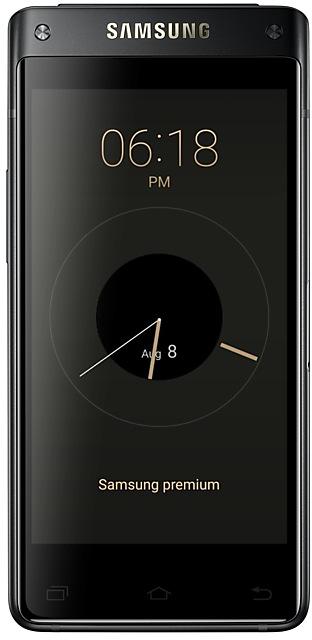
Samsung Galaxy
SM-G9298
- https://samfirm.shop/model/SM-G935TZK

Samsung Galaxy S7 edge 32GB Certified Re-Newed
SM-G935TZK


Frequently Asked Questions
🤗 Where can I find the Samsung firmware for model SM-G9280?
You can find the firmware on the model: SM-G9280 page.
Is the firmware for SM-G9280 official?
Yes, all firmware files for SM-G9280 are 100% official, original, and obtained directly from Samsung servers.
How to flash Samsung SM-G9280 using Odin?
To flash SM-G9280, you need to download the appropriate firmware, put your device into Download Mode, and use the Odin tool to load the BL, AP, CP, and CSC files.
Can I downgrade the Android version on SM-G9280?
Downgrading is only possible if the bootloader version (binary bit) of the old firmware matches the current one. Always check the binary version before flashing SM-G9280.