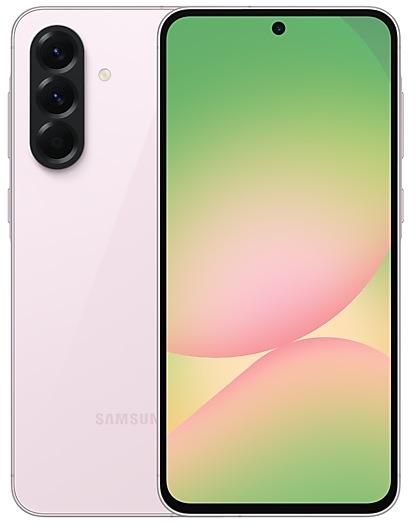
Samsung Galaxy A56 5G A566EXXSBCZF6 Firmware
Samsung Galaxy A56 5G A566EXXSBCZF6 is an Android 16 firmware for 4 countries, 4 CSC codes. It is the same firmware configured per region and carrier (CSC). Find your country below, verify the file and download for free. Compared with the previous build A566EXXSBCZF5 https://samfirm.shop/build/A566EXXSBCZF5, Android and the bootloader binary are unchanged, so you can switch between the two in both directions. A newer build for SM-A566E is available: A566EXXUEDZJ1 https://samfirm.shop/build/A566EXXUEDZJ1.
Bootloader binary B (11). Flashing firmware with a lower binary is usually blocked by Samsung anti-rollback.
All regional downloads
Pick your region (CSC) to download the matching firmware package.
How to flash A566EXXSBCZF6
- Install Samsung USB Drivers:Download Official Drivers
- Download Odin Flash Tool:
- A566EXXSBCZF6 has bootloader binary B (11). Your device must run binary B (11) or lower: it is the 5th character from the end of your current build number.
- CSC: Use CSC for a clean install, to change the region (CSC code), to downgrade or to repair a device that does not boot.
- HOME_CSC: Use HOME_CSC to update the same model and region while keeping your data. Back up anyway: a failed update can still require a reset.
- The Download Mode key combo depends on the model: see all combos.
What's new in A566EXXSBCZF6
• Security
The device is protected with improved security.
These changes may vary depending on the model, country, or network operator of the customer environment.
Security patch: June 2026
SMR Jun-2026 fixes 41 vulnerabilities, 5 of them critical. Android Security Bulletin: 32, Samsung Semiconductor: 1, Samsung-specific issues (SVE): 8.
Most severe Samsung fixes:
- high Improper authorization in AppBlock prior to SMR Jun-2026 Release 1 allows local attacker to launch arbitrary activity. User interaction is required for triggering this vulnerability. (CVE-2026-21031)
Rollout of A566EXXSBCZF6 by region
Samsung released this build in all regions (4) on the same day, June 25, 2026.
Device specifications
- Launched withAndroid 15
- Display diagonal17 cm (6.7")
- Display resolution1080 x 2340 pixels
- RAM8 GB
- Rear camera resolution50 MP
- Rear camera typeTriple camera
- Battery capacity5000 mAh
- Weight198 g
Specifications of SM-A566B, a regional variant of the same device. Chipset and SIM lines are left out: they can differ by region.
Frequently Asked Questions
Other builds and changelog for Samsung Galaxy A56 5G
More customizable quick panel
You can now rearrange and customize the controls in your quick panel even more than before. You can change the size of the brightness and volume sliders as well as the media player. You can also separate the sound mode button from the volume slider.
Warranty and care
The new Warranty and care menu in settings lets you check your warranty information and access diagnostic checks a...
• Security
The device is protected with improved security.
These changes may vary depending on the model, country, or network operator of the customer environment.
- A566EXXSECZI3Sep 16, 2026
- A566EXXSECZI2Sep 16, 2026
- A566EXXSDCZHCSep 3, 2026
- A566EXXSDCZHBSep 7, 2026
- A566EXXSCCZG7Jul 27, 2026
- A566EXXSCCZG6Jul 14, 2026
- A566EXXSBCZF6Jun 25, 2026
- A566EXXSBCZF5Jun 23, 2026
· Device stability improvements, bug fixes.
· New and / or enhanced features.
· Further improvements to performance.
• Security
The device is protected with improved security.
These changes may vary depending on the model, country, or network operator of the customer environment.
Fresh new look
One UI seamlessly integrates into your daily routine by combining immersive visuals with meaningful personalization for a more refined and sophisticated design. Transparent blur effects add depth and make content easier to navigate, while floating elements react organically to your workflow for a more focused experience. Through familiar and intuitive data visualization, One UI delivers a design that feels both personal and relatable, helping you focus...
Show 8 older builds
• Security
The device is protected with improved security.
These changes may vary depending on the model, country, or network operator of the customer environment.
- A566EXXSABZD3Apr 23, 2026
- A566EXXSABZD1Apr 20, 2026
- A566EXXS9BZC6Mar 30, 2026
- A566EXXS9BZC4Mar 30, 2026
- A566EXXS9BZB8Mar 5, 2026
- A566EXXS9BZB6Mar 2, 2026
- A566EXXS8BZA2Jan 28, 2026
- A566EXXS8BZA1Jan 26, 2026