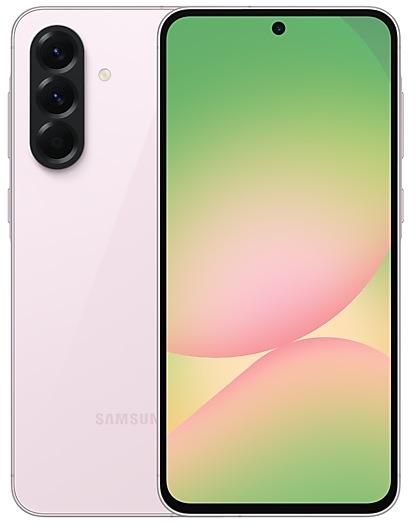
Samsung Galaxy A56 5G A566EXXUEDZJ1 Firmware
Samsung Galaxy A56 5G A566EXXUEDZJ1 is an Android 17 firmware for 10 countries, 15 CSC codes. It is the same firmware configured per region and carrier (CSC). Find your country below, verify the file and download for free. Compared with the previous build A566EXXSECZI3: Android updated from Android 16 to Android 17; security patch 2026-10-05 instead of 2026-09-05. This is the newest build for SM-A566E.
Bootloader binary E (14). Flashing firmware with a lower binary is usually blocked by Samsung anti-rollback.
All regional downloads
Pick your region (CSC) to download the matching firmware package.
No matching downloads
Device specifications
- Launched withAndroid 15
- Display diagonal17 cm (6.7")
- Display resolution1080 x 2340 pixels
- RAM8 GB
- Rear camera resolution50 MP
- Rear camera typeTriple camera
- Battery capacity5000 mAh
- Weight198 g
Specifications of SM-A566B, a regional variant of the same device. Chipset and SIM lines are left out: they can differ by region.
What's new in A566EXXUEDZJ1
More customizable quick panel
You can now rearrange and customize the controls in your quick panel even more than before. You can change the size of the brightness and volume sliders as well as the media player. You can also separate the sound mode button from the volume slider.
Warranty and care
The new Warranty and care menu in settings lets you check your warranty information and access diagnostic checks and useful information for keeping your Galaxy in top condition.
Lock down your phone quickly
It's now easier to securely lock your phone in a hurry. Just press and hold the Volume down and Side buttons at the same time or tap the Power button in the quick panel. This prevents biometrics from being used the next time you unlock your phone.
Location access transparency
Stay on top of your location privacy. A blue indicator will appear at the top of the screen when an app accesses your location. Tap the indicator in the quick panel to see which app it is.
New look for Samsung Health
Samsung Health has been redesigned to make your health data easier to understand. Enjoy clearer visuals, improved charts, and a more engaging experience to help you reach your health goals.
Customize your Health home screen
Resize cards and organize them by category, like Activity, Sleep, Mindfulness, and Nutrition, so your top priorities are easy to access.
Log health data quickly
It's now easier to add your health information right from the Samsung Health home screen. You can log your mood, meals, and more. You can even use the camera for faster input.
Advanced trend analysis
Track your progress with improved trend charts in Samsung Health. View data in hourly, daily, or weekly intervals, pinch to zoom in for a closer look, and overlay multiple charts to compare your performance across different periods.
Monitor changes in your sleep vitals
Samsung Health helps you notice meaningful changes in your sleep health data. Use Galaxy Watch or Ring measurements to better understand your daily health patterns.
Manage your heart health
Track key health metrics and lifestyle factors that affect your heart. A daily score based on your sleep, exercise, BMI, and vascular load helps you better understand your current heart health trends.
Track your cardio load
See how your workouts and activity impact your heart so you'll know when to push harder and when to rest. Your target cardio load range adjusts daily based on your recent activity and training focus.
Check your fitness index
Your Fitness Index is an overall score calculated using five key fitness metrics: body composition, cardio, strength, flexibility, and endurance. Set a goal and unlock personalized insights tailored to your results.
Keep your ears safe
The new Hearing tracker monitors sound levels detected by your Galaxy Watch and headphone audio levels to help you manage your exposure to loud sounds.
View your cycle and body rhythm
Get a more personalized view of your cycle and body rhythm with new cycle tracking options. You can view your cycle information in your calendar and better understand your health patterns.
Manage your conversations
Keep your chats organized. Search them, rename them, or pin your favorites. You can also delete all of your past conversations at once.
Bixby on the Home screen
Add a Bixby widget to type or talk to Bixby or jump directly to your conversation history.
Discover new Accessibility features
Check the What's new menu in Accessibility settings to learn about and try the latest Accessibility features for your Galaxy.
Text spotlight for easier reading
Need a closer look? Tap any text on the screen to show it enlarged and highlighted in its own window. You can also customize the font size, colors, and other settings to match your preferences.
Physical keyboard shortcuts
Use shortcuts on your physical keyboard to access the Accessibility settings you need without touching the screen.
Mouse keys enhancements
New options are available when using your keyboard for mouse interactions including speed and acceleration control. You can also use the keyboard's number pad to point and click.
Replace swipe with single tap
The Replace swipe with single tap option is now located in the Dexterity and interaction menu instead of the Assistant menu for easier access.
Select to speak
Get quick audio readouts without turning on full TalkBack. With the new Select to speak feature, you can select an item on your screen, like text or an image, and hear it read or described out loud.
Improved TalkBack updates
TalkBack updates can now be applied with a simple app update from the Play Store, helping you get the latest accessibility features and enhancements.
New Lock screen clock
The default clock on your Lock screen has been redesigned with a cleaner and more modern look that adapts to match your wallpaper.
How to flash A566EXXUEDZJ1
- Install Samsung USB Drivers:Download Official Drivers
- Download Odin Flash Tool:
- A566EXXUEDZJ1 has bootloader binary E (14). Your device must run binary E (14) or lower: it is the 5th character from the end of your current build number.
- CSC: Use CSC for a clean install, to change the region (CSC code), to downgrade or to repair a device that does not boot.
- HOME_CSC: Use HOME_CSC to update the same model and region while keeping your data. Back up anyway: a failed update can still require a reset.
- The Download Mode key combo depends on the model: see all combos.
Frequently Asked Questions
Other builds and changelog for Samsung Galaxy A56 5G
More customizable quick panel
You can now rearrange and customize the controls in your quick panel even more than before. You can change the size of the brightness and volume sliders as well as the media player. You can also separate the sound mode button from the volume slider.
Warranty and care
The new Warranty and care menu in settings lets you check your warranty information and access diagnostic checks a...
• Security
The device is protected with improved security.
These changes may vary depending on the model, country, or network operator of the customer environment.
• Security
The device is protected with improved security.
These changes may vary depending on the model, country, or network operator of the customer environment.
• Security
The device is protected with improved security.
These changes may vary depending on the model, country, or network operator of the customer environment.
• Security
The device is protected with improved security.
These changes may vary depending on the model, country, or network operator of the customer environment.
Show 15 older builds
• Security
The device is protected with improved security.
These changes may vary depending on the model, country, or network operator of the customer environment.
• Security
The device is protected with improved security.
These changes may vary depending on the model, country, or network operator of the customer environment.
• Security
The device is protected with improved security.
These changes may vary depending on the model, country, or network operator of the customer environment.
• Security
The device is protected with improved security.
These changes may vary depending on the model, country, or network operator of the customer environment.
· Device stability improvements, bug fixes.
· New and / or enhanced features.
· Further improvements to performance.
• Security
The device is protected with improved security.
These changes may vary depending on the model, country, or network operator of the customer environment.
Fresh new look
One UI seamlessly integrates into your daily routine by combining immersive visuals with meaningful personalization for a more refined and sophisticated design. Transparent blur effects add depth and make content easier to navigate, while floating elements react organically to your workflow for a more focused experience. Through familiar and intuitive data visualization, One UI delivers a design that feels both personal and relatable, helping you focus...
• Security
The device is protected with improved security.
These changes may vary depending on the model, country, or network operator of the customer environment.
• Security
The device is protected with improved security.
These changes may vary depending on the model, country, or network operator of the customer environment.
• Security
The device is protected with improved security.
These changes may vary depending on the model, country, or network operator of the customer environment.
• Security
The device is protected with improved security.
These changes may vary depending on the model, country, or network operator of the customer environment.
• Security
The device is protected with improved security.
These changes may vary depending on the model, country, or network operator of the customer environment.
• Security
The device is protected with improved security.
These changes may vary depending on the model, country, or network operator of the customer environment.
• Security
The device is protected with improved security.
These changes may vary depending on the model, country, or network operator of the customer environment.