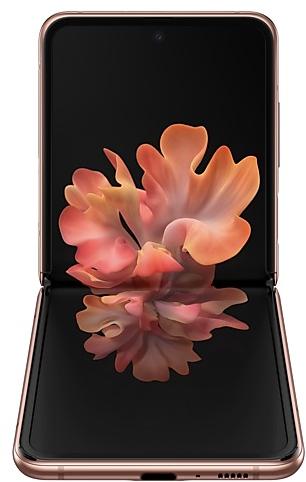
Samsung Galaxy Z Flip 5G F7070ZCU5IWB1 Firmware
Samsung Galaxy Z Flip 5G F7070ZCU5IWB1 is an Android 13 firmware for China (CHC). It is the same firmware configured per region and carrier (CSC). Find your country below, verify the file and download for free. Compared with the previous build F7070ZHU5IWB1 https://samfirm.shop/build/F7070ZHU5IWB1, Android and the bootloader binary are unchanged, so you can switch between the two in both directions. A newer build for SM-F7070 is available: F7070ZCUCJZE1 https://samfirm.shop/build/F7070ZCUCJZE1.
Bootloader binary 5. Flashing firmware with a lower binary is usually blocked by Samsung anti-rollback.
All regional downloads
Pick your region (CSC) to download the matching firmware package.
| Model | Region | CSC Version | Release date | Size | File name | Download |
|---|---|---|---|---|---|---|
| SM-F7070 |
CHC China | F7070CHC5IWB1 | 2023-03-06 | 7.526 GiB | SM-F7070_5_20230220162250_s3efcucwns_fac.zip | Download |
No matching downloads
How to flash F7070ZCU5IWB1
- F7070ZCU5IWB1 has bootloader binary 5. Your device must run binary 5 or lower: it is the 5th character from the end of your current build number.
- CSC: Use CSC for a clean install, to change the region (CSC code), to downgrade or to repair a device that does not boot.
- HOME_CSC: Use HOME_CSC to update the same model and region while keeping your data. Back up anyway: a failed update can still require a reset.
- The Download Mode key combo depends on the model: see all combos.
What's new in F7070ZCU5IWB1
One UI 5.1 takes your phone to the next level with new Gallery features as well as productivity and personalization enhancements.
More powerful search
You can now search your Gallery for more than one person or subject at the same time. You can even search for people without tagging their names just by tapping their faces.
Enhanced image remastering
Remastering does more to make your pictures look great by removing shadows and reflections. You can also remaster GIFs for better resolution and clarity. Preview has also been improved to make it easier to compare the original picture with the remaster.
Revamped info display
When you swipe up while viewing a picture or video in your Gallery, you can see when and where the picture was taken, which device took the picture, where the picture is stored, and more. Now with a simpler layout.
Easily minimize or switch to full screen
You can now minimize or maximize an app window without going to the options menu. Just drag one of the corners.
Access your most used apps in split screen
When you start a split-screen view, the apps you use most often will be shown below your recently used apps to help you find the apps you need faster.
Change wallpapers based on your mode
Set a different wallpaper based on your current activity. Choose one wallpaper for work, one for exercising, and more.
More actions for routines
New actions let you control S Share and Touch sensitivity, change your ringtone, and change your font style.
Summary on Weather widget
A brief summary of the current weather conditions now appears on the weather widget to let you know if it's sunny, cloudy, raining, or snowing.
Improved search
Your searches now include the names of bookmark folders and tab groups. Improved search logic lets you find what you're looking for even if something isn't spelled correctly.
Check the battery level of your devices
The new Battery widget lets you check the battery level of your devices, right from the Home screen. You can see how much battery is left on your phone, Galaxy Buds, Galaxy Watch, and other supported devices.
Settings suggestions
While signed in to your Samsung account, suggestions will appear at the top of the Settings screen to help you share, connect, and enhance your experience across your Galaxy devices.
Choose where to save screenshots and screen recordings
You can now change the folder where screenshots and screen recordings are saved.
※ Some apps will be changed to deletable.
※ The following features will have menus added to the Settings app and Camera app.
- Smart Manager : Settings → Smart Manager
- My Files : Settings → My Files
- Bixby : Settings → Advanced features → Bixby
- AR Zone : Camera → MORE → AR Zone
Device specifications
- Launched withAndroid 10.0
- Display diagonal17 cm (6.7")
- Display resolution2636 x 1080 pixels
- Display typeDynamic AMOLED
- RAM8 GB
- Rear camera resolution12 MP
- Rear camera typeDual camera
- Battery capacity3300 mAh
- Weight183 g
Specifications of SM-F707B, a regional variant of the same device. Chipset and SIM lines are left out: they can differ by region.
Frequently Asked Questions
Other builds and changelog for Samsung Galaxy Z Flip 5G
• Stability and reliability
Device behavior has been improved.
These changes may vary depending on the model, country, or network operator of the customer environment.
- F7070ZCUCJZE1Jun 1, 2026
- F7070ZHUCJZB1Apr 16, 2026
• The latest Android security patch has been applied.
- Device security has been further enhanced.
- F7070ZCSCJXG1Aug 26, 2024
- F7070ZHSCJXG1Aug 26, 2024
- F7070ZCSBJXE2Jun 11, 2024
- F7070ZHSBJXE2Jun 11, 2024
- F7070ZCSAJXC1Apr 19, 2024
- F7070ZHSAJXC1Apr 19, 2024
- F7070ZCS9JXA2Jan 23, 2024
- F7070ZHS9JXA1Jan 23, 2024
- F7070ZCU8JWJ1Nov 14, 2023
- F7070ZHU8JWI2Oct 23, 2023
Better app previews on the Recents screen
The Recents screen now shows apps as they will appear after you open them. You can easily see if an app is opened in split screen, full screen, or as a pop-up.
Easily switch from pop-up view to split screen
Press and hold the handle at the top of the pop-up window, then drag the app to the side of the screen where you want it to be shown.
Restore pop-ups snapped to the edge of the screen
Drag an app in pop-up view t...
- F7070ZCU8JWH9Sep 12, 2023
- F7070ZHU8JWH9Sep 12, 2023
• The latest Android security patch has been applied.
- Device security has been further enhanced.
- F7070ZCS8IWF1Aug 3, 2023
- F7070ZHS8IWF1Jul 18, 2023
- F7070ZCU7IWE3Jun 27, 2023
- F7070ZHU7IWE3Jun 27, 2023
- F7070ZHS6IWE1May 17, 2023
• The Camera and Gallery functions have been improved.
• Overall stability of your device has been improved.
• The latest Android security patch has been applied.
- Device security has been further enhanced.