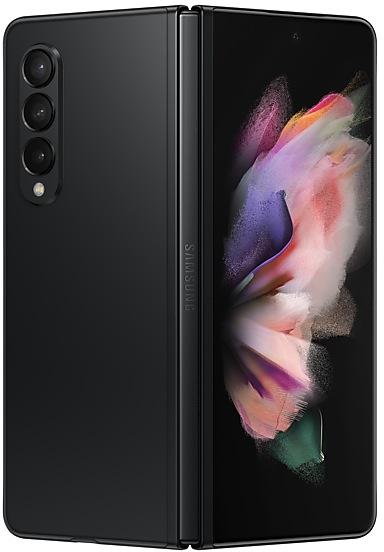
Samsung Galaxy Z Fold3 5G F926WVLU2FWB1 Firmware
Samsung Galaxy Z Fold3 5G F926WVLU2FWB1 is an Android 13 firmware for 4 countries, 18 CSC codes. It is the same firmware configured per region and carrier (CSC). Find your country below, verify the file and download for free. Compared with the previous build F926WVLU2EVL9 https://samfirm.shop/build/F926WVLU2EVL9: security patch 2023-02-01 instead of 2022-12-01. A newer build for SM-F926W is available: F926WVLSHKZH2 https://samfirm.shop/build/F926WVLSHKZH2.
Bootloader binary 2. Flashing firmware with a lower binary is usually blocked by Samsung anti-rollback.
All regional downloads
Pick your region (CSC) to download the matching firmware package.
| Model | Region | CSC Version | Release date | Size | File name | Download |
|---|---|---|---|---|---|---|
| SM-F926W |
BMC, BWA, CHR, ESK, FMC, GLW, KDO, PCM, PMB, RWC, SOL, TLS, VMC, VTR, XAC Canada
FIZ, SJR, TBT | F926WOYV2FWB1 | 2023-02-28 | 7.023 GiB | SM-F926W_3_20230206085640_d4jr9vw52h_fac.zip | Download |
No matching downloads
How to flash F926WVLU2FWB1
- F926WVLU2FWB1 has bootloader binary 2. Your device must run binary 2 or lower: it is the 5th character from the end of your current build number.
- CSC: Use CSC for a clean install, to change the region (CSC code), to downgrade or to repair a device that does not boot.
- HOME_CSC: Use HOME_CSC to update the same model and region while keeping your data. Back up anyway: a failed update can still require a reset.
- The Download Mode key combo depends on the model: see all combos.
What's new in F926WVLU2FWB1
One UI 5.1 takes your phone to the next level with new Gallery features as well as productivity and personalization enhancements.
Quickly change the color tone for selfies
It's easier to change the color tone of your selfies using the Effects button at the top of the screen.
Discover Expert RAW
Expert RAW lets you take high-quality shots, perfect for those who want to have full control and edit photos later. Expert RAW is now easier to access from the More menu in Camera.
More powerful search
You can now search your Gallery for more than one person or subject at the same time. You can even search for people without tagging their names just by tapping their faces.
Enhanced image remastering
Remastering does more to make your pictures look great by removing shadows and reflections. You can also remaster GIFs for better resolution and clarity. Preview has also been improved to make it easier to compare the original picture with the remaster.
Create a shared family album
It’s easier than ever to share pictures with your family. Gallery will recommend pictures to add to your shared family album by recognizing the faces of family members you select. You get 5 GB of storage for each family member (up to 6 people).
Revamped info display
When you swipe up while viewing a picture or video in your Gallery, you can see when and where the picture was taken, which device took the picture, where the picture is stored, and more. Now with a simpler layout.
Easily minimize or switch to full screen
You can now minimize or maximize an app window without going to the options menu. Just drag one of the corners.
Access your most used apps in split screen
When you start a split-screen view, the apps you use most often will be shown below your recently used apps to help you find the apps you need faster.
Improved multitasking in DeX
In split-screen view, you can now drag the divider in the center of the screen to resize both windows. You can also snap a window to one of the corners to make it fill a quarter of the screen.
Change wallpapers based on your mode
Set a different wallpaper based on your current activity. Choose one wallpaper for work, one for exercising, and more.
More actions for routines
New actions let you control Quick Share and Touch sensitivity, change your ringtone, and change your font style.
Quick access to useful information
Check severe weather alerts, daily weather summaries, and sunrise/sunset times at the top of the Weather app. The temperature graph now uses colors to show how the temperature changes throughout the day.
Hourly precipitation graph
An hourly graph now shows how much precipitation has fallen at different times of the day.
Summary on Weather widget
A brief summary of the current weather conditions now appears on the weather widget to let you know if it's sunny, cloudy, raining, or snowing.
Continue browsing on another device
If you're browsing the web on one Galaxy phone or tablet and later open the Internet app on another Galaxy device signed in to the same Samsung account, a button will appear that lets you open the last webpage you were viewing on the other device.
Improved search
Your searches now include the names of bookmark folders and tab groups. Improved search logic lets you find what you're looking for even if something isn't spelled correctly.
Let Bixby take your calls
Use Bixby text call to answer calls automatically and find out why the person is calling. You'll see what the caller says in a text chat, and you can tap or type responses that will be read aloud to the caller. Bixby text call is only available in English and Korean.
Check the battery level of your devices
The new Battery widget lets you check the battery level of your devices, right from the Home screen. You can see how much battery is left on your phone, Galaxy Buds, Galaxy Watch, and other supported devices.
Use up to 3 emojis in AR Emoji Camera
Take fun pictures and videos with your friends in Mask mode. You can assign a different emoji to each person’s face.
Settings suggestions
While signed in to your Samsung account, suggestions will appear at the top of the Settings screen to help you share, connect, and enhance your experience across your Galaxy devices.
Spotify suggestions
The Smart suggestions widget now recommends Spotify tracks and playlists based on your current activity. Get the perfect tunes for driving, exercising, and more. To get suggestions, you need to sign in to a Spotify account in the latest version of the Spotify app.
Choose where to save screenshots and screen recordings
You can now change the folder where screenshots and screen recordings are saved.
Rollout of F926WVLU2FWB1 by region
Samsung released this build in all regions (18) on the same day, February 28, 2023.
Device specifications
- Launched withAndroid 11
- Display diagonal19.3 cm (7.6")
- Display resolution2208 x 1768 pixels
- RAM12 GB
- RAM typeLPDDR5
- Rear camera resolution12 MP
- Rear camera typeTriple camera
- Battery capacity4400 mAh
- Weight271 g
Specifications of SM-F926B, a regional variant of the same device. Chipset and SIM lines are left out: they can differ by region.
Frequently Asked Questions
Other builds and changelog for Samsung Galaxy Z Fold3 5G
• Security
The device is protected with improved security.
These changes may vary depending on the model, country, or network operator of the customer environment.
- F926WVLSHKZH2Sep 11, 2026
- F926WVLSGKZE3Jun 5, 2026
- F926WVLSFKZB7Mar 23, 2026
- F926WVLSEKYK1Nov 28, 2025
- F926WVLSDKYGBAug 29, 2025
- F926WVLSDKYFDJul 25, 2025
- F926WVLSCKYF1Jul 8, 2025
• The security of your device has been improved.
Visual enhancements
Enjoy a more sophisticated and unique look. One UI 7 introduces a stunning redesign to key components including buttons, menus, notifications and control bars, providing a more consistent visual experience with curves and circles. Beautiful new colors, soft animations, and an innovative blur effect that's unique to One UI make information hierarchy clearer and help you focus on important information.
Reimagined Home screen
Fr...
• The security of your device has been improved.
- F926WVLSAJYB3Mar 21, 2025
- F926WVLS9JYB1Feb 28, 2025
- F926WVLS9JXLAJan 24, 2025
- F926WVLS9JXK9Dec 13, 2024
- F926WVLS9JXK5Nov 29, 2024
- F926WVLS8JXJ1Oct 18, 2024
Discover new insights and stay motivated
Stay inspired throughout your health experience with new wellness tips in Samsung Health. Wellness tips offer valuable insights and encouragement to help you achieve your health goals.
Get more detailed sleep analysis
New sleep insights give you more detailed and accurate analysis of your sleep quality. Your comprehensive sleep report now includes your heart rate, respiratory rate, and the amount of time it...
Show 4 older builds
• The security of your device has been improved.
- F926WVLS7IXG6Aug 16, 2024
- F926WVLS7IXFCJul 19, 2024
- F926WVLS6IXF1Jun 28, 2024
- F926WVLS6IXE5May 24, 2024