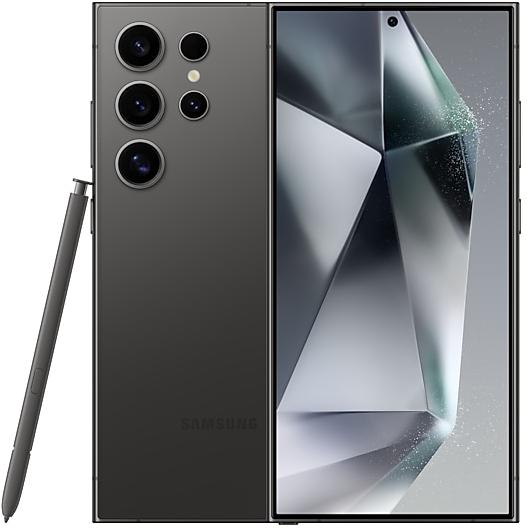
Samsung Galaxy S24 Ultra S928USQS4AXJB Firmware
Samsung Galaxy S24 Ultra S928USQS4AXJB is an Android 14 firmware for DSA, DSG, DSH. It is the same firmware configured per region and carrier (CSC). Find your country below, verify the file and download for free. Compared with the previous build S928USQS4AXJA https://samfirm.shop/build/S928USQS4AXJA, Android and the bootloader binary are unchanged, so you can switch between the two in both directions. A newer build for SM-S928U is available: S928USQS6EZJ1 https://samfirm.shop/build/S928USQS6EZJ1.
Bootloader binary 4. Flashing firmware with a lower binary is usually blocked by Samsung anti-rollback.
All regional downloads
Pick your region (CSC) to download the matching firmware package.
| Model | Region | CSC Version | Build Date | Release date | Size | File name | Download |
|---|---|---|---|---|---|---|---|
| SM-S928U |
DSA | S928UOYN4AXJB | 2024-11-04 | 2024-11-04 | 11.845 GiB | SM-S928U_1_20241026000841_62ljrx4dy8_fac.zip | Download |
| SM-S928U |
DSG | S928UOYN4AXJB | 2024-11-04 | 2024-11-04 | 11.845 GiB | SM-S928U_1_20241026012431_1xdbvbspek_fac.zip | Download |
| SM-S928U |
DSH | S928UOYN4AXJB | 2024-11-04 | 2024-11-04 | 11.845 GiB | SM-S928U_1_20241026005921_nhqeo3i02i_fac.zip | Download |
No matching downloads
How to flash S928USQS4AXJB
- S928USQS4AXJB has bootloader binary 4. Your device must run binary 4 or lower: it is the 5th character from the end of your current build number.
- CSC: Use CSC for a clean install, to change the region (CSC code), to downgrade or to repair a device that does not boot.
- HOME_CSC: Use HOME_CSC to update the same model and region while keeping your data. Back up anyway: a failed update can still require a reset.
- The Download Mode key combo depends on the model: see all combos.
What's new in S928USQS4AXJB
• Auto Blocker
After the update, when “Auto Blocker” is on with “Maximum restrictions”, USB devices will not be allowed to connect to this device except charging.
• Security
The device is protected with improved security.
Security patch: November 2024
SMR Nov-2024 fixes 50 vulnerabilities, 0 of them critical. Android Security Bulletin: 37, Samsung Semiconductor: 1, Samsung-specific issues (SVE): 12.
Most severe Samsung fixes:
- high Improper input validation in Dressroom (CVE-2024-49402)
- high Improper access control in Contacts (CVE-2024-34674)
- high Out-of-bounds write in libsubextractor.so (CVE-2024-34676)
Rollout of S928USQS4AXJB by region
Samsung released this build in all regions (3) on the same day, November 4, 2024.
Device specifications
- Display diagonal17.3 cm (6.8")
- Display resolution3120 x 1440 pixels
- RAM12 GB
- Rear camera resolution200 MP
- Rear camera typeQuad camera
- Battery capacity5000 mAh
- Weight232 g
Specifications of SM-S928B, a regional variant of the same device. Chipset and SIM lines are left out: they can differ by region.
Frequently Asked Questions
Other builds and changelog for Samsung Galaxy S24 Ultra
• Security
The device is protected with improved security.
These changes may vary depending on the model, country, or network operator of the customer environment.
Enhanced Now nudge
Now nudge provides helpful suggestions in more places throughout your Galaxy experience. In addition to the keyboard, suggestions will now appear in conversation notifications and in a floating button in the bottom right corner of the screen. There are also several new types of suggestions, like addresses or saving places in Google Maps.
Focus on someone important
My FanCam lets you select a person in a video and follow them automatically while cropping...
• Security
The device is protected with improved security.
These changes may vary depending on the model, country, or network operator of the customer environment.
- S928USQS6DZI1Sep 30, 2026
- S928USQS6DZH3Sep 1, 2026
- S928USQS6DZG1Jul 23, 2026
- S928USQS6DZF2Jun 23, 2026
- S928USQS6DZE2Jun 1, 2026
Fresh new look
One UI seamlessly integrates into your daily routine by combining immersive visuals with meaningful personalization for a more refined and sophisticated design. Transparent blur effects add depth and make content easier to navigate, while floating elements react organically to your workflow for a more focused experience. Through familiar and intuitive data visualization, One UI delivers a design that feels both personal and relatable, helping you focus...
• Security
The device is protected with improved security.
These changes may vary depending on the model, country, or network operator of the customer environment.
- S928USQS5CZD2Apr 15, 2026
- S928USQS5CZC1Mar 26, 2026
- S928USQS5CZB2Mar 5, 2026
- S928USQS4CZA1Jan 21, 2026
- S928USQS4CYL1Dec 18, 2025
- S928USQS4CYK2Nov 20, 2025
- S928USQS4CYJ1Oct 29, 2025
Show 5 older builds
See calls on the screen
Call captions show what each person says on the screen in real time during calls. Follow the conversation on your screen to make sure you don’t miss anything.
Create unique pet portraits
Bring out your pet's personality with Portrait studio. You can now apply portrait effects to pictures of dogs and cats in addition to people. Choose from styles like Fisheye lens, oil painting, and more.
Clean up sound
Use Audio eraser to automatica...
• Security
The device is protected with improved security.
These changes may vary depending on the model, country, or network operator of the customer environment.
- S928USQS4BYG2Aug 13, 2025
- S928USQS4BYF5Jul 17, 2025
The device is protected with improved security.
These changes may vary depending on the model, country, or network operator of the customer environment.
• Security
The device is protected with improved security.