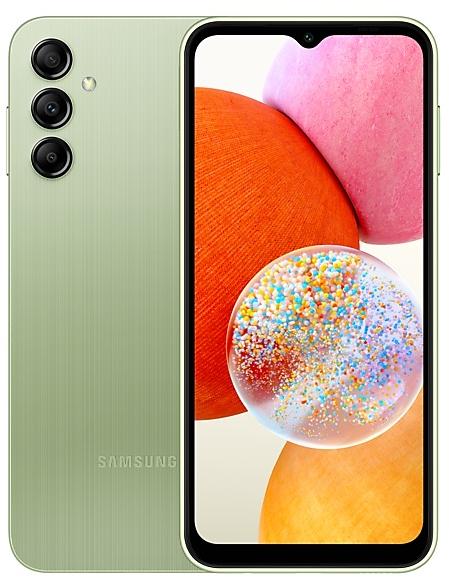
Samsung Galaxy A14 A145FXXUDDZB5 Firmware
Samsung Galaxy A14 A145FXXUDDZB5 is an Android 15 firmware for 33 countries, 47 CSC codes. It is the same firmware configured per region and carrier (CSC). Find your country below, verify the file and download for free. Compared with the previous build A145FXXSCDZA2 https://samfirm.shop/build/A145FXXSCDZA2: bootloader binary raised from C (12) to D (13), so after installing it there is no way back to older builds; security patch 2026-02-05 instead of 2025-11-01. A newer build for SM-A145F is available: A145FXXUFDZJ5 https://samfirm.shop/build/A145FXXUFDZJ5.
Bootloader binary D (13). Flashing firmware with a lower binary is usually blocked by Samsung anti-rollback.
All regional downloads
Pick your region (CSC) to download the matching firmware package.
| Model | Region | CSC Version | Build Date | Release date | Size | File name | Download |
|---|---|---|---|---|---|---|---|
| SM-A145F |
ACR, KSA Saudi Arabia
AFR, DKR Kenya
ECT Nigeria
EGY Egypt +10 more countries
FWD, MWD Morocco
ILO Israel
LYS Libya
MID Iraq
PAK, PKD Pakistan
TUN Tunisia
TUR Turkey
XFA, XFE, XFV South Africa
XSG United Arab Emirates
ILP | A145FOJMDDZB5 | 2026-03-09 | 2026-03-09 | 5.608 GiB | SM-A145F_3_20260214222831_zbc7nv1vdm_fac.zip | Download |
| SM-A145F |
BKD Bangladesh
INS India
NPB Nepal | A145FODMDDZB5 | 2026-03-23 | 2026-03-23 | 6.024 GiB | SM-A145F_3_20260218204031_y8od0qyhkp_fac.zip | Download |
| SM-A145F |
GLB, XTC Philippines
MM1, SIN, STH, XSP Singapore
MYM Myanmar (Burma)
OPS, TLP, VAU, XSA Australia +5 more countries
THL Thailand
XME Malaysia
XNZ New Zealand
XXV Vietnam
CAL | A145FOLMDDZB5 | 2026-03-10 | 2026-03-05 | 5.973 GiB | SM-A145F_3_20260220092710_uqxjm2nspt_fac.zip | Download |
| SM-A145F |
CAU, SKZ Kazakhstan
MBC Mongolia
SEK Ukraine
SER Russia | A145FOXMDDZB5 | 2026-03-09 | 2026-03-09 | 6.413 GiB | SM-A145F_3_20260215143410_hpjpwbm8fm_fac.zip | Download |
| SM-A145F |
PNG Papua New Guinea | A145FPNGDDZB5 | 2026-03-10 | 2026-03-10 | 5.531 GiB | SM-A145F_3_20260220134740_oj8swoi5cv_fac.zip | Download |
| SM-A145F |
VFJ Fiji | A145FVFJDDZB5 | 2026-03-10 | 2026-03-10 | 5.517 GiB | SM-A145F_3_20260220134811_taq150yt0d_fac.zip | Download |
| SM-A145F |
XID Indonesia | A145FOLEDDZB5 | 2026-03-05 | 2026-03-05 | 5.656 GiB | SM-A145F_3_20260220134710_auacf5lhox_fac.zip | Download |
No matching downloads
How to flash A145FXXUDDZB5
- A145FXXUDDZB5 has bootloader binary D (13). Your device must run binary D (13) or lower: it is the 5th character from the end of your current build number.
- CSC: Use CSC for a clean install, to change the region (CSC code), to downgrade or to repair a device that does not boot.
- HOME_CSC: Use HOME_CSC to update the same model and region while keeping your data. Back up anyway: a failed update can still require a reset.
- The Download Mode key combo depends on the model: see all combos.
What's new in A145FXXUDDZB5
• Overall stability of your device has been improved.
• The security of your device has been improved.
Security patch: February 2026
SMR Feb-2026 fixes 32 vulnerabilities, 0 of them critical. Android Security Bulletin: 25, Samsung-specific issues (SVE): 7.
Most severe Samsung fixes:
- high Improper access control in Emergency Sharing prior to SMR Feb-2026 Release 1 allows local attackers to interrupt its functioning. (CVE-2026-20977)
- high Improper export of android application components in Samsung Dialer prior to SMR Feb-2026 Release 1 allows local attackers to launch arbitrary activity with Samsung Dialer privilege. (CVE-2026-20983)
- high Improper authorization in KnoxGuardManager prior to SMR Feb-2026 Release 1 allows local attackers to bypass the persistence configuration of the application. (CVE-2026-20978)
Rollout of A145FXXUDDZB5 by region
- First release
- March 5, 2026
- Last region
- March 23, 2026
- Duration
- 19 days
- Regions
- 47
- Day 1 · · 8 regionsIndonesiaXIDMalaysiaXMEMyanmar (Burma)MYMPhilippinesGLBXTCThailandTHLVietnamXXVCAL
- Day 5 · · 25 regionsEgyptEGYIraqMIDIsraelILOKazakhstanCAUSKZKenyaAFRDKRLibyaLYSMongoliaMBCMoroccoFWDMWDNigeriaECTPakistanPAKPKDRussiaSERSaudi ArabiaACRKSA
+6 more countries
South AfricaXFAXFEXFVTunisiaTUNTurkeyTURUkraineSEKUnited Arab EmiratesXSGILP - Day 6 · · 11 regionsAustraliaOPSTLPVAUXSAFijiVFJNew ZealandXNZPapua New GuineaPNGSingaporeMM1SINSTHXSP
- Day 19 · · 3 regionsBangladeshBKDIndiaINSNepalNPB
Device specifications
- Launched withAndroid 13
- Display diagonal16.8 cm (6.6")
- Display resolution1080 x 2408 pixels
- RAM4 GB
- Rear camera resolution50 MP
- Rear camera typeTriple camera
- Battery capacity5000 mAh
- Weight201 g
Specifications of SM-A145R, a regional variant of the same device. Chipset and SIM lines are left out: they can differ by region.
Frequently Asked Questions
Other builds and changelog for Samsung Galaxy A14
• Stability and reliability
Device behavior has been improved.
• Security
The device is protected with improved security.
These changes may vary depending on the model, country, or network operator of the customer environment.
• Security
The device is protected with improved security.
These changes may vary depending on the model, country, or network operator of the customer environment.
- A145FXXSEDZF3Jun 29, 2026
- A145FXXSEDZF2Jun 11, 2026
• Security
The device is protected with improved security.
Software enhancement to provide an additional layer of connectivity to Triple Zero services during emergency service outages.
These changes may vary depending on the model, country, or network operator of the customer environment.
• Overall stability of your device has been improved.
• The security of your device has been improved.
• Security
The device is protected with improved security.
These changes may vary depending on the model, country, or network operator of the customer environment.
Show 14 older builds
• Circle to Search
Circle to Search with Google lets you easily learn more about anything shown on your screen without switching apps. Just touch and hold the Home button or navigation handle, then circle anything on the screen to start a Google search.
• Press and hold the Side button to access Google Gemini
The Side button is a new way to access Google Gemini or other digital assistant app quickly instead of using the corner swipe. You can change what the Side button does in Settings.
• Stabil...
• Security
The device is protected with improved security.
These changes may vary depending on the model, country, or network operator of the customer environment.
- A145FXXSADYH3Aug 20, 2025
- A145FXXSADYH2Aug 18, 2025
Visual enhancements
Enjoy a more sophisticated and unique look. One UI 7 introduces a stunning redesign to key components including buttons, menus, notifications and control bars, providing a more consistent visual experience with curves and circles. Beautiful new colors, soft animations, and an innovative blur effect that's unique to One UI make information hierarchy clearer and help you focus on important information.
Reimagined Home screen
Fr...
• Security
The device is protected with improved security.
- A145FXXS9CYE1Jun 17, 2025
- A145FXXS9CYB1Feb 25, 2025
• Stability and reliability
Device behavior has been improved.
• Security
The device is protected with improved security.
• The security of your device has been improved.
• Security
The device is protected with improved security.
• Stability and reliability
Device behavior has been improved.
• Security
The device is protected with improved security.
• Security
The device is protected with improved security.
Customize alarm alerts
Use an image, video, or AR emoji to create your own custom alert screens for each alarm. You can even change the layout of where the alarm information appears on the screen.
More stickers to personalize your calendar
You can now add up to 2 stickers for each date on your calendar. Stickers for events are now shown next to the event name in Month view.
Revamped Calendar settings
Calendar settings have been reorganized to be mo...
• Security
The device is protected with improved security.
- A145FXXS6BXE3May 27, 2024
- A145FXXS5BXA1Feb 7, 2024
New firmware for other devices
- Galaxy Watch9SM-L355U https://samfirm.shop/model/SM-L355U
- Galaxy Tab S11 UltraSM-X936B https://samfirm.shop/model/SM-X936B
- Galaxy A37 5GSM-A376E https://samfirm.shop/model/SM-A376E
- Galaxy S23+SM-S916U https://samfirm.shop/model/SM-S916U
- Galaxy Z Fold7SM-F966U https://samfirm.shop/model/SM-F966U
- Galaxy A27 5GSM-A276B https://samfirm.shop/model/SM-A276B
- Galaxy A27 5GSM-A276U https://samfirm.shop/model/SM-A276UCCTDSA