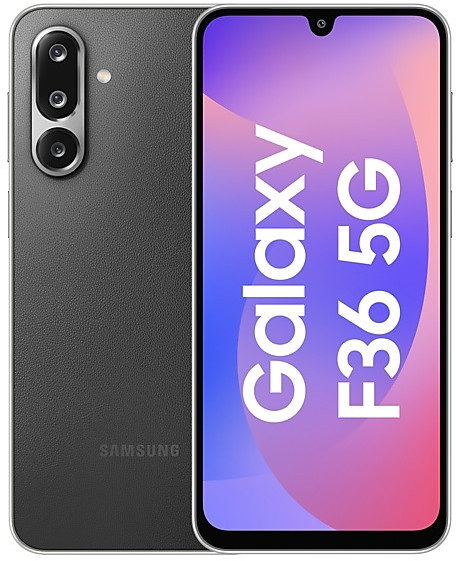
Download Samsung Firmware SM-E366B
Samsung Galaxy F36 5G
The latest firmware for Samsung Galaxy F36 5G (SM-E366B) is E366BXXS8BZH3 with Android 16, released on September 9, 2026 for 1 region (CSC). Every official firmware build for SM-E366B, newest first: one row per build with all regions (CSC) that received it.
- Builds
- 10 builds
- Regions (CSC)
- 1 region
Firmware builds for SM-E366B
- INS
- INS
- INS
- INS
- INS
- INS
- INS
- INS
- INS
- INS
Each firmware build has its own page at https://samfirm.shop/build/{PDA}, where {PDA} is the build number from the list above. Example: https://samfirm.shop/build/E366BXXS8BZH3
SM-E366B update history
SM-E366B started on Android 15 and has received 1 major Android upgrade; it now runs Android 16. The newest build, E366BXXS8BZH3, was released on September 9, 2026 with the August 2026 security patch. Over the last 12 months SM-E366B received 7 builds, spread over 7 different months.
Changelog for SM-E366B
• Security
The device is protected with improved security.
These changes may vary depending on the model, country, or network operator of the customer environment.
• Security
The device is protected with improved security.
These changes may vary depending on the model, country, or network operator of the customer environment.
Fresh new look
One UI seamlessly integrates into your daily routine by combining immersive visuals with meaningful personalization for a more refined and sophisticated design. Transparent blur effects add depth and make content easier to navigate, while floating elements react organically to your workflow for a more focused experience. Through familiar and intuitive data visualization, One UI delivers a design that feels both personal and relatable, helping you focus...
• Security
The device is protected with improved security.
These changes may vary depending on the model, country, or network operator of the customer environment.
• Security
The device is protected with improved security.
These changes may vary depending on the model, country, or network operator of the customer environment.
Show 4 older builds
• Security
The device is protected with improved security.
These changes may vary depending on the model, country, or network operator of the customer environment.
• Security
The device is protected with improved security.
These changes may vary depending on the model, country, or network operator of the customer environment.
Beautiful new wallpapers
More choices are available to help you find the wallpaper that's right for you. New additions include interactive and dynamic wallpapers like color gradients that change over time.
Check stock prices without unlocking
Stocks you follow on Google Finance with big price changes will appear on your Now bar at the end of the trading day.
Easier file sharing with Quick Share
It's never been easier to send and recei...
• Security
The device is protected with improved security.
These changes may vary depending on the model, country, or network operator of the customer environment.
Similar Models
- https://samfirm.shop/model/SM-E085F

Galaxy F08
SM-E085F
- https://samfirm.shop/model/SM-E476B

Samsung Galaxy F70 Pro 5G
SM-E476B
- https://samfirm.shop/model/SM-E076B

Samsung Galaxy F70e 5G
SM-E076B
- https://samfirm.shop/model/SM-E075F

Samsung Galaxy F07
SM-E075F
- https://samfirm.shop/model/SM-E176B

Samsung Galaxy F17 5G
SM-E176B
- https://samfirm.shop/model/SM-E566B

Samsung Galaxy F56 5G
SM-E566B
- https://samfirm.shop/model/SM-E066B
Samsung Galaxy F06 5G
SM-E066B
- https://samfirm.shop/model/SM-E166P

Samsung Galaxy F16 5G
SM-E166P


Frequently Asked Questions
What is the latest Android version for SM-E366B?
The newest firmware for SM-E366B runs Android 16: build E366BXXS8BZH3, released on September 9, 2026.
When did SM-E366B get its last update?
The latest build for SM-E366B, E366BXXS8BZH3, was released on September 9, 2026 (1 month ago).
How often does SM-E366B get updates?
Over the last 12 months SM-E366B received 7 builds, with at least one new build in 7 different months.
Is the firmware for SM-E366B official?
Yes, all firmware files for SM-E366B are 100% official, original, and obtained directly from Samsung servers.
How to flash Samsung SM-E366B using Odin?
To flash SM-E366B, you need to download the appropriate firmware, put your device into Download Mode, and use the Odin tool to load the BL, AP, CP, and CSC files.
Can I downgrade the Android version on SM-E366B?
Downgrading is only possible if the bootloader version (binary bit) of the old firmware matches the current one. Always check the binary version before flashing SM-E366B.