Download Samsung Firmware SM-X710
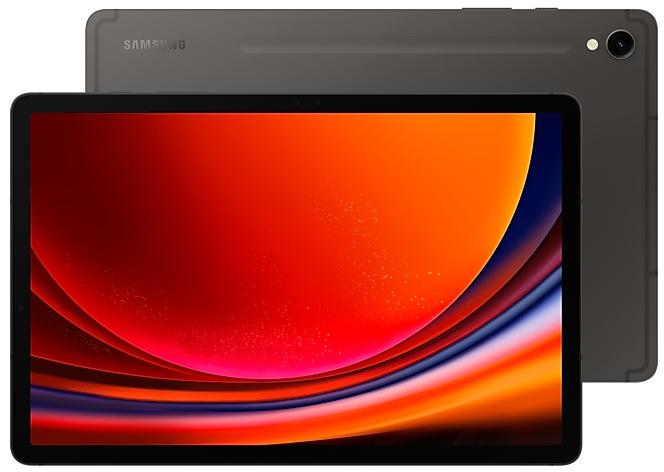
Samsung Galaxy Tab S9
The latest firmware for Samsung Galaxy Tab S9 (SM-X710) is X710XXS6EZI2 with Android 16, released on September 24, 2026 for 20 regions (CSC). Every official firmware build for SM-X710, newest first: one row per build with all regions (CSC) that received it.
- Builds
- 57 builds
- Regions (CSC)
- 21 regions
Firmware builds for SM-X710
- CHN
- CHN
- CHN
- CHN
- CHN
- CHN
- CHN
- KOO
- CHN
- CHN
- CHN
- XAR
- ILOTURXSG
- CHN
- XAR
- ILOTURXSG
- CHN
- XAR
- ILOTURXSG
- CHN
- KOO
- CHN
- CHN
- EUXEUY
- CHN
- EUXEUY
- CHN
- CHN
- CHN
- BRIMXOTGYZBRZTO
Each firmware build has its own page at https://samfirm.shop/build/{PDA}, where {PDA} is the build number from the list above. Example: https://samfirm.shop/build/X710XXS6EZI2
SM-X710 update history
SM-X710 started on Android 13 and has received 3 major Android upgrades; it now runs Android 16. The newest build, X710XXS6EZI2, was released on September 24, 2026 with the September 2026 security patch. That patch (SMR Sep-2026) fixes 80 vulnerabilities, 20 of them critical. Over the last 12 months SM-X710 received 14 builds, spread over 7 different months. Builds of this model reach 21 regions (CSC); KOO (South Korea) usually gets a new build first (89% of recent builds). Samsung guarantees security updates for this model until June 26, 2028.
Device specifications
- Launched with
- Android 13
- Display diagonal
- 27.9 cm (11")
- Display resolution
- 2560 x 1600 pixels
- Display technology
- AMOLED
- Rear camera resolution
- 13 MP
- Rear camera type
- Single camera
- Front camera resolution
- 12 MP
- Wi-Fi standard
- Wi-Fi 6 (802.11ax)
- Weight
- 498 g
Specifications of SM-X710N, a regional variant of the same device. Chipset and SIM lines are left out: they can differ by region.
Changelog for SM-X710
• Security
The device is protected with improved security.
These changes may vary depending on the model, country, or network operator of the customer environment.
- X710XXS6EZI2Sep 24, 2026
- X710ZCS6EZH3Sep 15, 2026
- X710XXS6EZH3Sep 3, 2026
- X710XXS6EZG3Jul 30, 2026
- X710ZCS6EZF1Jul 7, 2026
- X710XXS6EZF1Jun 29, 2026
Fresh new look
One UI seamlessly integrates into your daily routine by combining immersive visuals with meaningful personalization for a more refined and sophisticated design. Transparent blur effects add depth and make content easier to navigate, while floating elements react organically to your workflow for a more focused experience. Through familiar and intuitive data visualization, One UI delivers a design that feels both personal and relatable, helping you focus...
- X710ZCU6EZE3Jun 4, 2026
- X710XXU6EZE3Jun 1, 2026
• Security
The device is protected with improved security.
These changes may vary depending on the model, country, or network operator of the customer environment.
- X710ZCS6DZB6Mar 10, 2026
- X710XXS6DZB6Mar 9, 2026
- X710ZCS5DZA1Jan 26, 2026
- X710XXS5DZA1Jan 22, 2026
- X710ZCS5DYJ2Oct 30, 2025
- X710XXS5DYJ2Oct 27, 2025
Create unique pet portraits
Bring out your pet's personality with Portrait studio. You can now apply portrait effects to pictures of dogs and cats in addition to people. Choose from styles like Fisheye lens, oil painting, and more.
More convenient AI results
When you summarize or translate content in Samsung Internet or Samsung Notes, the results will now appear alongside the original so you can view them together.
New Lock screen clock...
Create unique pet portraits
Bring out your pet's personality with Portrait studio. You can now apply portrait effects to pictures of dogs and cats in addition to people. Choose from styles like Fisheye lens, oil painting, and more.
Translate emergency alerts
Never miss important alerts even if they’re not in your language. When you receive an emergency alert in a language that’s different from your system language, Galaxy AI will automatically translate it...
Show 14 older builds
• Stability and reliability
Device behavior has been improved.
• Security
The device is protected with improved security.
These changes may vary depending on the model, country, or network operator of the customer environment.
• Security
The device is protected with improved security.
These changes may vary depending on the model, country, or network operator of the customer environment.
- X710ZCS5CYG2Jul 30, 2025
- X710XXS5CYG1Jul 23, 2025
Write like a pro
Let Galaxy AI help you with writing tasks by tapping the 4-star icon that appears whenever you select text. You can correct spelling and grammar, change tone, summarize, or apply formatting. You can even start with a short snippet and let the AI do the writing for you.
Effortlessly create images
Drawing assist makes it easier than ever to create fun images. Start with a simple sketch, add an image, or type in what you want to create...
- X710ZCU5CYDAApr 28, 2025
- X710XXU5CYD9Apr 22, 2025
• The latest Android security patch has been applied.
- Device security has been further enhanced.
• Security
The device is protected with improved security.
• The security of your device has been improved.
• The latest Android security patch has been applied.
- Device security has been further enhanced.
• Security
The device is protected with improved security.
- X710XXS5BYA5Feb 10, 2025
- X710XXU5BXL7Feb 5, 2025
• Stability and reliability
Device behavior has been improved.
• Security
The device is protected with improved security.
• Overall stability of your device has been improved.
• The latest Android security patch has been applied.
- Device security has been further enhanced.
1 retail code (SKU)
Box codes of SM-X710 for different colors and markets. Firmware is chosen by the model code SM-X710 and your region (CSC), not by the SKU.
- SM-X710NZAAEUE
Similar Models
- https://samfirm.shop/model/SM-X710N

Samsung Galaxy Tab S9, 8GB RAM +
SM-X710N
- https://samfirm.shop/model/SM-X716N

Samsung Galaxy Tab S9 5G
SM-X716N
- https://samfirm.shop/model/SM-X810N

Samsung Galaxy Tab S9+, 12GB RAM +
SM-X810N
- https://samfirm.shop/model/SM-X610N

Samsung Galaxy Tab S9 FE+, 8GB RAM +
SM-X610N
- https://samfirm.shop/model/SM-X616N

Samsung Galaxy Tab S9 FE+ 5G
SM-X616N


Frequently Asked Questions
What is the latest Android version for SM-X710?
The newest firmware for SM-X710 runs Android 16: build X710XXS6EZI2, released on September 24, 2026.
When did SM-X710 get its last update?
The latest build for SM-X710, X710XXS6EZI2, was released on September 24, 2026 (1 month ago).
How often does SM-X710 get updates?
Over the last 12 months SM-X710 received 14 builds, with at least one new build in 7 different months.
Is the firmware for SM-X710 official?
Yes, all firmware files for SM-X710 are 100% official, original, and obtained directly from Samsung servers.
How to flash Samsung SM-X710 using Odin?
To flash SM-X710, you need to download the appropriate firmware, put your device into Download Mode, and use the Odin tool to load the BL, AP, CP, and CSC files.
Can I downgrade the Android version on SM-X710?
Downgrading is only possible if the bootloader version (binary bit) of the old firmware matches the current one. Always check the binary version before flashing SM-X710.