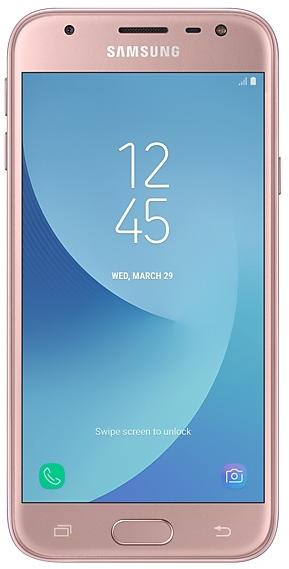
Samsung Galaxy J3 Pro J330GDXU3BRH1 Firmware
Samsung Galaxy J3 Pro J330GDXU3BRH1 is an Android 8.0.0 (Oreo) firmware for 11 countries, 15 CSC codes. It is the same firmware configured per region and carrier (CSC). Find your country below, verify the file and download for free. Compared with the previous build J330GDXU3ARF1 https://samfirm.shop/build/J330GDXU3ARF1: Android updated from Android 7.0 (Nougat) to Android 8.0.0 (Oreo). A newer build for SM-J330G is available: J330GDXU3CZC1 https://samfirm.shop/build/J330GDXU3CZC1.
Bootloader binary 3. Flashing firmware with a lower binary is usually blocked by Samsung anti-rollback.
All regional downloads
Pick your region (CSC) to download the matching firmware package.
| Model | Region | CSC Version | Release date | Size | File name | Download |
|---|---|---|---|---|---|---|
| SM-J330G |
BRI Taiwan | J330GZZT3BRG3 | 2018-09-04 | — | — | Download |
| SM-J330G |
CAM Cambodia | J330GOLB3BRH1 | — | — | — | Download |
| SM-J330G |
MYM Myanmar (Burma) | J330GOLB3BRH1 | — | — | — | Download |
| SM-J330G |
NZC New Zealand | J330G3BRG3 | — | — | — | Download |
| SM-J330G |
PNG Papua New Guinea | J330G3BRG3 | — | — | — | Download |
| SM-J330G |
THL Thailand | J330GOLB3BRH1 | — | — | — | Download |
| SM-J330G |
TNX New Zealand | J330G3BRG3 | — | — | — | Download |
| SM-J330G |
TNZ New Zealand | J330G3BRG3 | — | — | — | Download |
| SM-J330G |
VFJ Fiji | J330G3BRG3 | — | — | — | Download |
| SM-J330G |
VNZ New Zealand | J330G3BRG3 | — | — | — | Download |
| SM-J330G |
XID Indonesia | J330GOLE3BRH1 | — | — | — | Download |
| SM-J330G |
XME Malaysia | J330GOLB3BRH1 | — | — | — | Download |
| SM-J330G |
XNZ New Zealand | J330G3BRG3 | — | — | — | Download |
| SM-J330G |
XSP Singapore | J330GOLB3BRH1 | — | — | — | Download |
| SM-J330G |
XXV Vietnam | J330GOLB3BRH1 | — | — | — | Download |
No matching downloads
How to flash J330GDXU3BRH1
- J330GDXU3BRH1 has bootloader binary 3. Your device must run binary 3 or lower: it is the 5th character from the end of your current build number.
- CSC: Use CSC for a clean install, to change the region (CSC code), to downgrade or to repair a device that does not boot.
- HOME_CSC: Use HOME_CSC to update the same model and region while keeping your data. Back up anyway: a failed update can still require a reset.
- The Download Mode key combo depends on the model: see all combos.
What's new in J330GDXU3BRH1
Samsung Experience 9.0 brings you Android Oreo, with exciting new features from Samsung and Google based on feedback from users like you.
We recommend that you back up your important data to keep it safe during the upgrade.
Some apps, including Samsung Internet, Samsung Notes, and Email, should be updated individually before you can update your OS.
Here’s what’s new.
Quick Panel
- Manage notifications for each app with notification categories (supported apps only).
- Icons will be shown at the bottom of the notification panel for notifications that aren't currently visible.
Home Screen
- Touch and hold an app to display shortcuts to common or recommended tasks within the app (supported apps only).
- Notification badges on app icons and in the notification panel are synced. Clear a notification in one location, and it will show as cleared in the other location.
Samsung Keyboard
- The Samsung keyboard toolbar gives quick access to useful functions.
- GIF keyboard lets you send GIFs using Samsung keyboard.
System Performance
- Background services are limited to improve performance and battery life.
Samsung account
- Control your account settings and profile information for multiple apps.
- Tap your profile picture on the main Settings page to access your profile information and account settings.
Samsung Cloud
- View and manage photos and notes stored only in Samsung Cloud.
- Store any type of file in Samsung Cloud Drive.
- Select specific items to delete or restore from your backups.
- See how big each backup is and how many items it contains.
Find My Mobile
- Back up Secure Folder remotely in Samsung Cloud when your phone is lost.
Other improvements
- Bluetooth now supports high-quality audio codecs, including AAC and Sony LDAC.
- Voice Recorder provides smart tips to conveniently block calls while recording.
- Email lets you flag Microsoft Exchange ActiveSync emails.
- Samsung Health's new sticky notification lets you see your step count at a glance.
- Clock now includes a Landscape mode and timer sound options.
- The digital clock widget goes directly to the Clock app when you tap it.
Rollout of J330GDXU3BRH1 by region
Samsung released this build in all regions (1) on the same day, September 4, 2018.
Device specifications
- Display diagonal12.7 cm (5")
- Display resolution720 x 1280 pixels
- Display typeTFT-LCD
- RAM2 GB
- Rear camera resolution13 MP
- Rear camera typeSingle camera
- Battery capacity2400 mAh
- Weight142 g
Specifications of SM-J330, a regional variant of the same device. Chipset and SIM lines are left out: they can differ by region.
Frequently Asked Questions
Other builds and changelog for Samsung Galaxy J3 Pro
• The security of your device has been improved.
The exact changes may differ depending on your device model, country/Region, and service provider.
• The latest Android security patch has been applied.
- Device security has been further enhanced.
· The security of your device has been improved.
- The latest Android security patch has been applied.
ㆍDevice security has been further enhanced.
Show 15 older builds
One UI brings you Android Pie 9.0, with exciting new features and a whole new look and feel based on feedback from users in Samsung and Google.
We recommend that you back up your important data to keep it safe before the upgrade.
Some apps, including Calculator, Samsung Internet, Samsung Health, Samsung Notes, and Samsung Members, need to be updated individually after you update your OS.
To use the Remote unlock function in Find My Mobile on an Android Pie 9....
- The latest Android security patch has been applied.
ㆍDevice security has been further enhanced.
· The security of your device has been improved.
- J330GDXS3BSC2Apr 15, 2019
- J330GDXS3BSC1Mar 20, 2019
- Other bug fixes
ㆍThe stability of device is improved.
ㆍBluetooth connectivity and stability has been improved.
- The latest Android security patch has been applied.
ㆍDevice security has been further enhanced.
- The latest Android security patch has been applied.
ㆍDevice security has been further enhanced.
Samsung Experience 9.0 brings you Android Oreo, with exciting new features from Samsung and Google based on feedback from users like you.
We recommend that you back up your important data to keep it safe during the upgrade.
Some apps, including Samsung Internet, Samsung Notes, and Email, should be updated individually before you can update your OS.
Here’s what’s new.
Quick Panel
- Manage notifications for each app with notification categories...
- The latest Android security patch has been applied.
ㆍDevice security has been further enhanced.
- The latest Android security patch has been applied.
ㆍDevice security has been further enhanced.