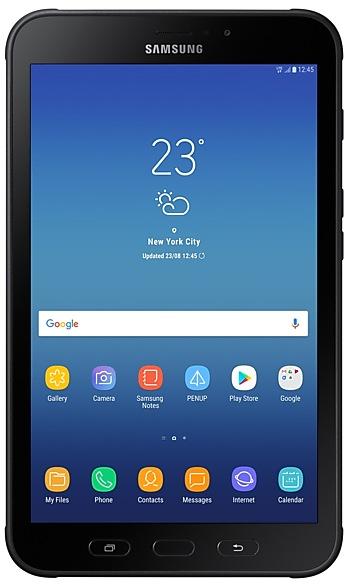
Samsung Galaxy TAB Active2 SM-T397U firmware
The latest firmware for Samsung Galaxy TAB Active2 (SM-T397U) is T397UUEUCCVF2 with Android 9 (Pie), released on July 18, 2022 for 2 regions (CSC). Every official firmware build for SM-T397U, newest first: one row per build with all regions (CSC) that received it.
- Builds
- 12 builds
- Regions (CSC)
- 3 regions
Firmware builds for SM-T397U
- ATTVZW
- ATTVZW
- XAC
- ATTVZW
- XAC
- ATTVZW
- XAC
- ATTVZW
- XAC
- ATTVZW
- XAC
- ATTVZW
Each firmware build has its own page at https://samfirm.shop/build/{PDA}, where {PDA} is the build number from the list above. Example: https://samfirm.shop/build/T397UUEUCCVF2
SM-T397U update history
All 12 builds in our database run Android 9 (Pie). The newest build, T397UUEUCCVF2, was released on July 18, 2022 with the January 2022 security patch. No new build has appeared for 52 months, so regular updates for this model have most likely ended.
Device specifications
- Launched with
- Android 7.1
- Display diagonal
- 20.3 cm (8")
- Display resolution
- 1280 x 800 pixels
- Processor frequency
- 1.6 GHz
- Processor family
- Samsung Exynos
- Processor model
- 7870
- Rear camera resolution
- 8 MP
- Rear camera type
- Single camera
- Front camera resolution
- 5 MP
- Wi-Fi standard
- Wi-Fi 5 (802.11ac)
- Weight
- 417 g
Changelog for SM-T397U
· The security of your device has been improved.
• The security of your device has been improved.
- T397UUESBCUK1Dec 1, 2021
- T397UVLSBCUI1Nov 2, 2021
· The security of your device has been improved.
- T397UUESBCUG1Sep 1, 2021
- T397UVLSBCUF2Aug 4, 2021
• The security of your device has been improved.
· The security of your device has been improved.
- T397UVLSACUD1Apr 27, 2021
- T397UUEU9CUA1Feb 25, 2021
- T397UVLS9CTK1Dec 23, 2020
- T397UUES8CTJ1Nov 18, 2020
- T397UVLS8CTI1Sep 29, 2020
Show 15 older builds
· Device stability improvements, bug fixes.
· New and / or enhanced features.
· Further improvements to performance.
· The security of your device has been improved.
· Device stability improvements, bug fixes.
· New and / or enhanced features.
· Further improvements to performance.
· The security of your device has been improved.
- T397UVLS6CTA1 Feb 12, 2020
- T397UUES5CSL2 Jan 15, 2020
- T397UVLS5CSK1 Dec 2, 2019
One UI brings you Android Pie, with exciting new features and a whole new look and feel based on feedback from users in Samsung and Google.
We recommend that you back up your important data to keep it safe before the upgrade.
Some apps, including Calculator, Samsung Internet, and Samsung Notes, need to be updated individually after you update your OS.
To use the Remote unlock function in Find My Mobile on an Android Pie device, the screen lock password (or PIN/pa...
- T397UVLU4CSI1 Oct 3, 2019
- T397UUEU4CSI1 Sep 16, 2019
· The security of your device has been improved.
- T397UVLS4BSG1 Aug 1, 2019
- T397UUES4BSF3 Jul 9, 2019
· The security of your device has been improved.
Samsung Experience 9.5 brings you Android Oreo, with exciting new features from Samsung and Google based on feedback from users like you.
We recommend that you back up your important data to keep it safe during the upgrade.
Some apps, including Samsung Internet, Samsung Notes, and Email, should be updated individually before you can update your OS.
Here’s what’s new.
Quick Panel
- Manage notifications for each app with notification categories...
- T397UVLU2BRK1 Dec 3, 2018
- T397UUEU2BRK4 Nov 27, 2018
· Bluetooth connectivity and stability has been improved
· The security of your device has been improved.
1 retail code (SKU)
Box codes of SM-T397U for different colors and markets. Firmware is chosen by the model code SM-T397U and your region (CSC), not by the SKU.
- SM-T397UZKAXAA
New firmware for other devices
- Galaxy Z Flip8SM-F776N https://samfirm.shop/model/SM-F776N
- Galaxy Tab S10 Ultra 5GSM-X926N https://samfirm.shop/model/SM-X926NKOO
- Galaxy Z Flip7SM-F766U1 https://samfirm.shop/model/SM-F766U1
- Galaxy Tab S10 LiteSM-X400 https://samfirm.shop/model/SM-X400KOO
- Galaxy Tab S8+ 5GSM-X806E https://samfirm.shop/model/SM-X806EEUX
Similar Models
- https://samfirm.shop/model/SM-T395C

Samsung Galaxy Tab Active2
SM-T395C
- https://samfirm.shop/model/SM-T290N

Samsung Galaxy Tab A 8.0, 64GB, Black
SM-T290N
- https://samfirm.shop/model/SM-T387V

Samsung Galaxy Tab A 8.0
SM-T387V
- https://samfirm.shop/model/SM-T385S
Samsung Galaxy Tab A (2017)
SM-T385S
- https://samfirm.shop/model/SM-T297

Samsung Galaxy Tab A (8.0, 2019)
SM-T297


Frequently Asked Questions
What is the latest Android version for SM-T397U?
The newest firmware for SM-T397U runs Android 9 (Pie): build T397UUEUCCVF2, released on July 18, 2022.
When did SM-T397U get its last update?
The latest build for SM-T397U, T397UUEUCCVF2, was released on July 18, 2022 (4 years ago).
How often does SM-T397U get updates?
SM-T397U has had no new firmware for 52 months, so regular updates have most likely ended.
Is the firmware for SM-T397U official?
Yes, all firmware files for SM-T397U are 100% official, original, and obtained directly from Samsung servers.
How to flash Samsung SM-T397U using Odin?
To flash SM-T397U, you need to download the appropriate firmware, put your device into Download Mode, and use the Odin tool to load the BL, AP, CP, and CSC files.
Can I downgrade the Android version on SM-T397U?
Downgrading is only possible if the bootloader version (binary bit) of the old firmware matches the current one. Always check the binary version before flashing SM-T397U.
Is this the stock ROM or flash file for SM-T397U?
Yes. Every build on this page is the official stock ROM for SM-T397U from Samsung's update server, the same package other sites call the flash file or the software update. It installs with Odin on a Windows PC.
Does flashing firmware remove the FRP lock on SM-T397U?
No. Factory Reset Protection is tied to the Google account that was on the phone and survives a firmware flash. Sign in with that account or use the legal options in our FRP guide.